Projects – Fall 2026
Click on a project to read its description.
Sponsor Background
The Benjamin Franklin Scholars Program at N.C. State allows students to simultaneously pursue bachelor’s degrees in both engineering and the humanities/social sciences. By combining a degree in engineering with one in the liberal arts, the program provides students with a broad perspective which better equips them to solve the complex problems of today and the future.
Franklin scholars can combine any degree in the College of Engineering with any degree in the College of Humanities and Social Sciences (plus economics). In addition to their course work for those two degrees, students in the program take two courses specifically designed for Franklin Scholars: STS302H (Science, Technology and Human Values) and E497 (The Franklin Scholars Capstone). Students typically complete the program in 4 to 5 years.
The primary purpose of the program is to develop future leaders and technical professionals whose range of skills and perspectives will match the kinds of interdisciplinary challenges the world increasingly faces. The program fosters a strong community among both its students and alumni that emphasizes intellectual curiosity, open-mindedness, breadth of education, and diversity of interests.
In its 33 years the Franklin Scholars Program at N.C. State has produced nearly 250 graduates who have used their engineering and liberal arts training in a variety of settings and professions, including industry, academia, and government. Their careers run a broad gamut, including as engineers, lawyers, physicians, policy analysts, and entrepreneurs, to name a few.
Background and Problem Statement
In 2024, the Franklin Scholars Program at N.C. State formed an alumni association (BFSAA) whose mission is:
to strengthen and enhance the Benjamin Franklin Scholars (BFS) Program by further connecting students and alumni in order to better exchange knowledge and experience while deepening the sense of a larger, tighter community.
Its goals are to:
- Enhance the student experience
- Enhance the alumni experience
- Increase student motivation and program retention rate
- Increase ongoing support and funding for the program
- Strengthen the sense of belonging and membership in a life-long community
- Better understand and articulate how the program benefits its graduates both professionally and personally throughout their lives
- Further promote the program both within and beyond the university.
Specifically, key objectives of the BFSAA are to better connect alumni and students through an enhanced alumni mentoring and advising program, alumni speaker programs, periodic student/alumni events, and a robust alumni directory/database which can be accessed via a BFSAA webpage portal.
In the fall of 2024 the initial version of the portal/database was developed by a team of students in the CSC Senior Design Project course under the leadership and mentorship of Mr. Ballou, who created the functional specifications. That portal was implemented in January, 2025 and has been successfully running since then. Although the portal and database serve most of the needs of the BFSAA, a number of changes/enhancements have since been identified that would not only improve the portal’s usability but provide additional functionality.
The problem this project will address is the development and implementation of those changes to create a Version 2.0. Version 2.0 will serve to further advance the above goals, as it will allow for improved communication and connection between students and alumni alike. Mr. Ballou, who has extensive knowledge of the current version, would serve again as the project liaison and mentor to the student team.
Project Description
Version 1.0 of the BFSAA webpage allows secure access to BFS alumni information, including not only contact and relevant personal and professional information but searchable fields on degrees, willingness to mentor and advise, willingness to participate in BFS-sponsored events, previous attendance at such events, and donations to the program. Each alumnus has a user ID and password by which they can update their own information and view and search selected fields of other alumni.
Current students can use the webpage and database to search for alumni whose backgrounds best fit their needs for an ongoing mentor or advisor who might be of assistance in career planning. The BFS Program Director uses the application to track alumni donations and participation in various program social events. Alumni can better connect with one another for ongoing social and professional purposes. Certain fields in the database are open to view by all users while others are only viewable by each individual alumnus and the Program Director. Hence, the application provides various levels of security.
The webpage also includes a news page which provides a means of communicating to all alumni periodic news on the BFS program as well as on the BFS Alumni Association itself.
For more information on the current database, the webpage capabilities, and technical and implementation details, the functional and detailed specifications as well as all system and user documentation for Version 1.0 can be consulted. Those documents were produced by the BFSAA to provide original design requirements and by the CSC Senior Design Project team as part of the course requirements.
Enhancements for Version 2.0 fall into three categories:
- Addition of an elections function. Every three years the BFSAA elects new board members (5) and officers, including a President, Vice-President/Treasurer, and Secretary/Communications Director. The three officers must come from the newly formed Board. Elections are a multi-step process that includes: 1) announcement of the elections season 2) nomination of new board members 3) voting to elect those members 4) nomination of officers from the newly elected board 5) voting on those board members and 6) announcements of the various results. During each elections step, in the event of ties runoffs are necessary before moving to the next step. Currently the elections process is conducted via email announcements and email ballots and can be cumbersome and error prone. Version 2.0 would provide mechanisms by which all of the steps would be accomplished through the webpage portal via a function that could be activated by the BFS Program Director. The Director could also control when the elections season begins and ends as well as the start date and conclusion date for each of the various steps in the process. The full elections process is defined in the BFSAA ”Constitution” and “Policies and Procedures” documents which are accessible on the BFSAA webpage. Further, nomination and balloting forms have been developed which can be used as textual templates in automating the function. Those documents will serve as functional specifications for the elections process. This part of the project would call upon the students’ abilities to analyze an existing documented process, capture its logic, and then translate that logic into working code.
- Addition of automated, real time updating of alumni donations and automated generation of appreciation emails. Alumni donations to the BFS program help support a) the everyday needs of the program, including student events, the annual fall banquet, the annual spring awards night, and other essential student activities and b) scholarships and financial aid for outstanding students in the program. Version 1.0 of the database includes for each alumnus the date of their last donation to the BFS program, the donation amount, the number of years they have donated, and their total donations to date. Currently, the BFS Program Director must manually track and update this information. This is a time-consuming task which is only done periodically, so the information is often not current. By connecting to the NC State College of Engineering’s CRM system and associated donations database, Version 2.0 would initially download current Franklin alumni donation information and then subsequently update the BFSAA database records as donations are received. Additional fields could also be added to the current BFSAA database to provide a full history of donations. Finally, as donations are made, Version 2.0 would automatically generate an email thanking the alumnus for their contribution. On an annual basis the system would also create for each donor an acknowledgement email of contributions made that year as well as a summary report to the BFS Director of those who had donated that year. By better tracking and acknowledging donations, the hope is that funds for scholarships and program activities will increase over time, thus enhancing the viability and effectiveness of the BFS program. This part of the project would afford students the opportunity to build a secure interface between two existing applications.
- Cosmetic and usability enhancements. Although Version 1.0 is functional and has met all needs as outlined in the original functional specs for the version, we would like the CSC Senior Design team assigned to the Version 2.0 project to review the webpage for potential visual and user interface improvements. The goal here is not only to make the portal more user-friendly but to encourage more alumni and students to actively utilize it. The more alumni who are on the database and the more complete the information they provide, the more effective the BFSAA will be. The Franklin Scholars Program has identified some cosmetic changes, but welcomes the suggestions the student team can offer to make for a better overall experience. This portion of the project would provide the students with experience in evaluating and critiquing an existing application, analyzing its strengths and weaknesses, and presenting opportunities for improvement.
Technologies and Other Constraints
For the most part, the technologies and applications utilized to develop the initial webpage and database should be utilized in developing the enhancements and additional functions. And as in the original application, the additional functions should be accessible either by personal computer or mobile phone. There are no known licensing constraints or legal or IP issues.
Existing technologies/languages/frameworks: Django, PostgreSQL, MaterialUI
Students will be required to sign over IP to sponsors when the team is formed
Sponsor Background
College Board is a mission-driven not-for-profit organization serving millions of students, educators, and schools through programs including the SAT, AP, and CLEP. The Accessibility Compliance Office (ACO) leads College Board's efforts to ensure its products, services, and communications are accessible to all users — working across the organization to meet and exceed accessibility standards and advance equitable access for students with disabilities.
Background and Problem Statement
The periodic table is a foundational tool in chemistry education — and one of the most spatially complex information structures students encounter on high-stakes assessments. For blind and low-vision students taking Chemistry, the AP Chemistry course, or the AP Chemistry exam, current accessible formats fall significantly short. A physical braille version exists but is impractical at scale. Some digital implementations reduce the table to a linear list of atomic numbers, symbols, and atomic mass — stripping away the spatial relationships between element groups, periods, and families that are central to chemical understanding and reasoning.
Recent usability feedback from blind users at the 2026 National Federation of the Blind Conference confirmed what the data suggests: current screen reader navigation of the periodic table is awkward, informationally incomplete, and adds significant cognitive load during testing. Existing accessible implementations — including work by accessibility developer Adrian Roselli — offer promising structural approaches, but College Board's is interested in exploring additional possibilities.
The gap is not merely technical. Without a genuinely accessible periodic table, blind and low-vision students face a structural barrier to taking AP Chemistry — and by extension, to chemistry as a discipline. As one observer noted, if a student cannot access the AP Chemistry exam, it is unlikely they will ever pursue a chemistry major. The numbers of blind chemistry students may be small, but the equity stakes are significant and the problem is solvable.
College Board's Accessibility Compliance Office is actively seeking partners — including technical collaborators, accessibility experts, and the chemistry community — to help envision and build a better solution.
Project Description
The goal of this project is to design and prototype an accessible periodic table experience for blind and low-vision users that preserves — rather than strips away — the spatial relationships, groupings, and structural logic that make the periodic table meaningful.
The Core Design Challenge
A truly accessible periodic table is not a linearized list. It is an interface that allows a blind or low-vision user to navigate the same conceptual landscape that a sighted user sees at a glance — moving between rows and groups, understanding an element's relationship to its neighbors, and retrieving specific properties efficiently under timed, high-stakes testing conditions. The solution must work within the constraints of common screen readers (JAWS, NVDA, VoiceOver) and must be operable without a mouse.
Potential Directions to Explore
Several approaches merit exploration, and a strong project would examine and test more than one:
Structural navigation improvements — Building on existing accessible implementations such as Adrian Roselli's periodic table markup, the project could focus on restoring and improving the underlying HTML and ARIA structure to support meaningful two-dimensional navigation. The current College Board implementation has degraded this structure in ways that create list counts exceeding 119 entries; correcting and extending this is a tractable near-term improvement.
Spatial audio or sonification — Representing the table's two-dimensional structure through sound — using pitch, tone, or spatial audio cues to convey position, grouping, or element properties — could offer a fundamentally different and potentially more intuitive navigation experience for blind users.
Search and query functionality — Rather than navigating the full table, a well-designed search interface could allow users to retrieve element information by name, symbol, atomic number, or property — reducing cognitive load during testing while preserving access to the full dataset. Though for testing, some of these characteristics (name, properties) would need to be able to be disabled.
Tactile and hybrid approaches — For contexts where physical materials are available, exploring refreshable braille display compatibility or tactile overlays in combination with digital audio could offer a richer, multi-modal experience.
User-Centered Design Requirements
Any solution must be developed in close partnership with blind and low-vision users. Feedback from the 2026 NFB Conference has already surfaced key usability concerns; a successful project would build on that foundation through structured usability testing with this community throughout the design process — not only at the end. The chemistry and accessibility communities should be engaged as advisors, including the small but important community of blind chemists who can speak to the real-world demands of chemistry coursework and assessment. The sponsoring group, College Board, can help with these connections.
Scope and Deliverables
A project in this space might reasonably aim to produce one or more of the following:
- A working accessible prototype of the periodic table, built to WCAG 2.2 AA standards and tested with screen readers
- A comparative analysis of existing accessible implementations with recommendations for College Board's current deployment
- A usability testing report based on sessions with blind and low-vision users
- A design specification or technical recommendation that College Board's technology team can act on
- A longer-term roadmap for expanded functionality, including search, sonification, or multi-modal access
Why This Matters
The periodic table is not a peripheral feature. It is a required tool in many STEM courses, including AP Chemistry — one of the most widely taken advanced coursework programs in the United States. A student who cannot navigate it independently under testing conditions is not being assessed on chemistry; they are being assessed on their ability to work around an accessibility barrier. Solving this problem well would have immediate impact for students taking the AP Chemistry exam, and potential broader application across science education and assessment more broadly.
This is a technically interesting, socially meaningful, and genuinely unsolved problem. It sits at the intersection of web accessibility, human-computer interaction, chemistry education, and assistive technology — and it is ready for serious attention.
Technologies and Other Constraints
Screen Readers — Required for Testing
Any solution must be tested across the major screen readers in active use by blind and low-vision users. These are not flexible — a solution that works on one but not others is not a complete solution.
- JAWS (Job Access With Speech) — Windows; the most widely used screen reader in professional and educational settings; required
- NVDA (NonVisual Desktop Access) — Windows; free and open source; widely used and must be supported; required
- VoiceOver — macOS and iOS; built into Apple devices; required for cross-platform coverage
- TalkBack — Android; required if any mobile access is in scope
Browsers — Required for Testing
Screen reader and browser combinations behave differently and must be tested in combination, not independently.
- Chrome with NVDA or JAWS — the most common pairing; required
- Firefox with NVDA — widely used; required
- Safari with VoiceOver — required for Apple device coverage
- Edge with JAWS — increasingly common in educational and enterprise settings; recommended
Core Web Standards — Required
These are not flexible. Any implementation must conform to these standards to be viable for College Board deployment.
- HTML5 — semantic, well-structured markup is the foundation of any accessible implementation; required
- ARIA (Accessible Rich Internet Applications) — correct use of ARIA roles, properties, and states is essential for conveying the table's structure to assistive technology; required; note that incorrect or overuse of ARIA is a known failure mode in existing implementations
- WCAG 2.2 AA — Web Content Accessibility Guidelines, Level AA; required minimum standard for College Board; Level AAA conformance on relevant criteria is encouraged where achievable
- Keyboard navigability — full operability without a mouse is required; tab order, arrow key navigation, and focus management must all be explicitly designed and tested
Development Technologies — Flexible
The choice of implementation technology is flexible provided the output meets the standards above. Options include:
- Vanilla HTML/CSS/JavaScript — preferred for accessibility; fewer abstraction layers means fewer opportunities for ARIA and semantic markup to be overridden or broken by a framework
- React, Vue, or other component frameworks — acceptable if the team has experience managing accessibility in these environments; requires additional care around focus management and dynamic content announcements
- SVG with ARIA annotations — a potential approach for conveying spatial structure; accessibility support varies across screen reader and browser combinations and would require extensive testing
Existing Implementations to Reference — Not Constraints, but Starting Points
- Adrian Roselli's periodic table (adrianroselli.com/2019/05/periodic-table-of-the-elements.html) — the most well-known accessible implementation; College Board's current version has degraded this markup and should be compared carefully against the original
- Rich Caloggero's implementation (richcaloggero.github.io/periodic-table/) — an alternative approach worth evaluating and testing with users
Audio and Sonification Technologies — Flexible if Explored
If the project explores sonification or spatial audio as a navigation approach:
- Web Audio API — browser-native; no additional dependencies; recommended if pursuing this direction
- Tone.js — JavaScript library built on Web Audio API; flexible
- Compatibility with screen readers must be verified, as audio output from the page can conflict with screen reader audio output in some configurations
Assistive Technology Hardware — Recommended for Testing
- Refreshable braille display — if the project explores braille display compatibility; not required but strongly recommended for any implementation claiming braille support
- Standard keyboard — all navigation must be testable with a standard keyboard only; no specialized hardware should be required of the end user
Constraints — Fixed
- The solution must function within a secure, proctored digital testing environment (College Board uses Bluebook); any implementation must be compatible with that environment's browser and security constraints
- No reliance on third-party plugins or browser extensions — test takers cannot install additional software
- Performance — the solution must load and respond quickly; blind users relying on screen readers are sensitive to lag in focus movement and dynamic content updates
- No external API calls during testing — the solution must function fully offline or within a closed network environment
- Content accuracy — element data must be current and verified against authoritative sources (IUPAC)
Constraints — Flexible but Recommended
- Designing for WCAG 2.2 AAA on relevant criteria (e.g., reading level, contrast) is encouraged but not required
- Supporting reduced motion preferences (prefers-reduced-motion) is recommended for users sensitive to animation
- Internationalizing element names and labels is a longer-term consideration and not required for an initial prototype
We would like for any output from this to be open source to aid the wider community if possible.
Sponsor Background
NC State DELTA, an organization within the Office of the Provost, seeks to foster the integration and support of digital learning in NC State’s academic programs. We are committed to providing innovative and impactful digital learning experiences for our community of instructors and learners, leveraging emerging technologies to craft effective new ways to engage and explore.
Background and Problem Statement
Over the past several years DELTA has created a number of branching dialogue "chatbot" interfaces for immersive learning, with a small variety of modes for conversational interaction. The core of the idea hinges on a JSON format containing a set of "roles" and "nodes" connected by reference IDs in order to map out the flow of a conversation. The format is intentionally extremely broad, assuming one user role but allowing for as many potential scripted roles and branching paths as needed and—since any node can be jumped into "by ID"—does not require linear or fully connected dialogue paths. Another aspect of the design is that this data format is meant to be entirely display-agnostic, allowing for a variety of display modes to pull from this same format.
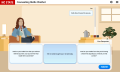

In the examples above, the very first instance was a basic chat widget offering deeper insight into the PDF next to it. We used a texting-like interface for another instance, and have two other instances that feature a more face-to-face conversational UI (see the Counseling Chatbot at https://cechatbot.ced.ncsu.edu/ for an example.) Previously we've had to develop each of these display modes somewhat ad-hoc on a case by case basis, and we see value in having a user-friendly authoring interface for selecting a general mode of interaction and then customizing the look and feel of the display with custom colors, images, and text treatments.
This authoring interface would not eliminate bespoke chatbot implementations, but is meant to supplement them and lower the barrier for rapid iteration.
Project Description
This project would entail the creation of a web-based application that primarily offers the user intuitive tools to create a chatbot display interface. The tool should be able to select from a variety of templates (widget, text app, conversation, etc.) and then allow the user to customize colors, text treatment, images, and related display aspects in a visual editor. For example, say an instructor wants to create a chabot modeling a scenario where you are a counselor guiding the conversation in a session with a client. That instructor would, at minimum, need to be able to:
- Select a conversational option from a list of template / prototype display modes
- Customize the look and feel of the template to match the tone of the conversation.
- Export their customized display as a zip archive of static web site files for hosting.
Note: there is a separate chatfile editor that handles the node content authoring, the intention with this project is separately configuring display interfaces.
Technologies and Other Constraints
The editor should run in any modern major web browser, and all resulting display interfaces should do the same. We are open to suggestions for any web development platforms and libraries that may make WYSIWYG template editing easier to develop and expand over time, and we are equally open to a flexible scope in terms of the number of template options and the degree of customization within each one. The format of the chatfile itself is more firm, but we are still experimenting with best practices and seeking to accommodate a wide range of conversation types.
Students will be required to sign over IP to sponsors when the team is formed
Sponsor Background
ITHG Dental AI is a healthtech / AI company building Oraxs, a modular cloud-based platform for dental practices and educational clinic environments. Oraxs is designed to integrate daily dental workflows such as booking, patient communication, charting, clinical documentation, imaging workflow support, billing/invoicing, reporting, training/onboarding and AI-assisted operational workflows.
This project is directly relevant to ITHG Dental AI because the company is preparing Oraxs for U.S. market readiness and wants to create a practical, student-buildable adaptation and demo package for U.S. dental hygiene and educational clinic use cases.
Background and Problem Statement
Oraxs is being introduced through early clinic onboarding in Iceland and is being prepared for international expansion, including the United States. However, U.S. dental and dental hygiene workflows differ from Icelandic/Nordic workflows in terminology, documentation structure, educational clinic supervision, role definitions and stakeholder expectations.
A particularly useful U.S. entry point is dental hygiene and educational clinic environments. These environments often require student/instructor workflows, role-based permissions, instructor review and approval of student documentation, structured hygiene assessment templates, synthetic demo data and clear pilot/demo materials.
The problem for the student team is to help bridge the gap between the existing Oraxs product direction and a U.S.-ready educational clinic demonstration. The work should create a scoped, non-production prototype/configuration package that can support early conversations and future pilots with U.S. dental hygiene programs, educational clinics and selected dental practices.
Project Description
The envisioned solution is a web-based demo/prototype and configuration package that shows how Oraxs could support a U.S. dental hygiene / educational clinic workflow. The project should not be a mission-critical production implementation; instead, it should be a well-scoped Senior Design project using sandbox resources, mock APIs and synthetic data.
The minimum viable project should include:
- U.S. workflow and terminology adaptation: create a U.S. dental / dental hygiene workflow map and implement or configure relevant labels, field names, role descriptions and demo clinic settings.
- Educational clinic role model: define and implement/configure Student, Instructor, Admin and Front Desk roles, including appropriate permissions and visibility rules.
- Instructor review / approval workflow: implement a supervision workflow where a student can draft or complete a clinical note or hygiene assessment and an instructor can review, approve, return or request changes.
- Structured hygiene documentation templates: create U.S.-oriented demo templates such as medical history review, periodontal charting summary, oral hygiene assessment, treatment notes and follow-up recommendations.
- U.S. demo clinic environment: configure a demonstration clinic using synthetic patients, users, roles, appointments and documentation examples.
- Demo script and pilot checklist: create a clear demonstration script and an onboarding checklist for a future U.S. pilot, including accounts, roles, workflows to test and acceptance steps.
- Documentation and handoff package: provide technical documentation, configuration notes, known limitations, test cases, demo steps and recommendations for future productization.
Example use case: A dental hygiene student logs into the demo clinic, opens a synthetic patient appointment, completes a structured hygiene assessment, saves a draft note and submits it for instructor review. The instructor receives or sees the item in a review queue, reviews the note, requests changes or approves it. The approved note becomes part of the synthetic educational clinic record for demonstration purposes.
The end users for this project include future U.S. dental hygiene programs, educational clinic instructors, dental students/hygiene students, clinic administrators and ITHG Dental AI staff preparing U.S. pilots. The project will help ITHG Dental AI demonstrate U.S. workflow readiness in a concrete, credible and repeatable way.
Stretch goals, if the core scope is completed early, may include an instructor dashboard, configurable chart note templates by role or clinic type, simple demo analytics, import/export of demo configuration packages, or mock integration points for future educational systems or patient communication flows.
Technologies and Other Constraints
Technology requirements and suggestions:
- Paradigm: web-based prototype, configuration layer or demo environment. Mobile-responsive design is helpful but not required.
- Required: synthetic/sample data only. Students must not access real patient data, production patient data or protected health information (PHI).
- Required: role-based workflow logic for Student, Instructor, Admin and Front Desk users.
- Required: at least one end-to-end student-to-instructor review/approval workflow.
- Suggested technologies: React/TypeScript, JavaScript/TypeScript, .NET, Node.js, Python, PostgreSQL/SQL/JSON storage, mock APIs, OpenAPI specifications, Docker, GitHub and standard web testing tools. These are suggestions; the student team may recommend alternatives if appropriate.
- Suggested design tools: Figma, Miro, Lucidchart or similar tools for workflow mapping and prototype design.
- Suggested testing: unit tests and/or integration tests covering role permissions, workflow transitions and demo data scenarios.
- Sponsor resources: ITHG Dental AI expects to provide product walkthroughs, weekly guidance, synthetic demo data, domain feedback and either a hosted sandbox/demo environment or an agreed technical alternative before the semester begins.
Limitations:
- No real patient data or PHI may be used in this project.
- Any AI-related functionality must be framed as workflow or documentation assistance only, not clinical diagnosis or medical decision-making.
- Any clinical documentation created in the project is for educational demonstration only and not for use in real patient care.
- The project should not require access to production systems, production credentials or live clinic data.
- The project should include meaningful software engineering work and should not be limited only to documentation or manual configuration.
- The sponsor expects the project to be scoped for a one-semester Senior Design team, with a clear core MVP and optional stretch goals.
Intellectual property / legal constraint: The sponsor requires that students assign project-specific intellectual property created for this sponsored project to the sponsor when the team is formed. This is because the project relates directly to Oraxs product adaptation, workflows, configuration concepts and demo assets for a commercial platform. Students may retain their general know-how, learning, skills and experience, and portfolio/academic use can be discussed subject to confidentiality and NC State sponsor terms. Pre-existing Oraxs IP, product materials, product architecture, brand assets, workflows, data models, software, documents and related company materials remain the property of ITHG Dental AI and/or its affiliated companies.
Students will be required to sign over IP to sponsors when the team is formed
Sponsor Background
Katabasis is a non-profit organization that specializes in developing educational software for children ages 8-15. Our mission is to facilitate learning, inspire curiosity, and catalyze growth in every member of our community by building a digital learning ecosystem that adapts to the individual, fosters collaboration, and cultivates a mindset of growth and reflection.
Background and Problem Statement
Creative writing can be a complex task that requires iteration, feedback, and attention to detail. CHAPTERS is a project designed to help students with executive planning, cognitive load, and critical feedback to set them up for success.
In particular, CHAPTERS is built to support science fiction writing for high school students. Students choose specific real-world scientific phenomena as the basis for their story, and develop plots and characters stemming from a theme relating to their science topic. As such, students will need to brainstorm ideas, cultivate their concept, and organize details. This project provides helpful avenues for students to get started with their writing process.
Project Description
CHAPTERS provides a framework that guides high school students through a sequence of scaffolded activities designed to help them transform an initial science topic into a structured narrative plan. Students begin by logging into their class and selecting one of the science topics made available by their teacher. They then make a series of creative decisions, such as selecting a theme, defining a setting, developing a “What if?” question to summarize their story concept, identifying a few main characters, and choosing a narrative point of view.
For example, a student selecting plants as their science topic may choose a solarpunk theme, set their story on a floating city in the year 3000, and pose the question: What if genetically engineered plants became humanity’s primary source of energy? The student would then select a narrative structure, such as Freytag’s Pyramid, which would prompt the student to describe the exposition, rising action, climax, falling action, and resolution of their story.
Student responses should be saved between sessions, allowing them to continue developing their ideas over time. Teachers should be able to review student progress, responses, and completed outlines within their classes.
Your team will be responsible for developing web interface(s) that facilitate this brainstorming process and allow teachers to access the results of this process for the students in their classes.
Technologies and Other Constraints
This project is a web-based application, and will be created using Docker Compose with the following tech stack:
- React for the frontend
- Django/Python for the backend
- MySQL for the database
Students will be required to sign over IP to sponsors when the team is formed
Sponsor Background
SAS provides technology that is used around the world to transform data into intelligence. A key component of SAS technology is providing access to good, clean, curated data. The Analytics Lifecycle department is responsible for helping users create standard, repeatable methods for integrating, improving, and enriching data. This project is being sponsored by the SAS Data Governance team (as part of the Analytics Lifecycle) in order to help users better leverage their data assets.
Background and Problem Statement
An increasingly prevalent and accelerating problem for businesses is dealing with the vast amount of information being collected. Combined with lacking data governance, enterprises are faced with conflicting use of domain-specific terminology, varying levels of data quality/trustworthiness, and fragmented access. Lack of timely and accurate data reporting may end up driving poor decisions, operational inefficiencies, and financial losses. This is in addition to the exposure of businesses to regulatory penalties, compliance failures, and reputational damage and ultimately putting businesses at a competitive disadvantage.
To help address the underlying issues related to managing their data, a business may buy, or build, a data governance solution that allows them to holistically identify and govern an enterprise's data assets. At SAS we've developed a data catalog product which enables customers to inventory the assets within their SAS Viya ecosystem. The product also allows users to discover various assets, explore metadata, and visualize how the assets are used throughout the platform. Our data catalog also provides a curated view of the metadata that is stored within the environment. This is with the intention to provide easy to understand dashboards and visualizations, about specific types of metadata, to a widespread audience and as a result hides some of the metadata and the underlying complexity.
Last semester, we had our student teams investigate building a metadata explorer (an alternate view into the metadata stored in our catalog). The explorer is an interface that gives user unfiltered access to all the metadata in the environment (that they are authorized to view). If the catalog is akin to a traditional, physical library card system then the explorer is akin to walking through the bookstacks or shelves. An explorer opens up additional possibilities for end users. If we're already providing an interface to view the metadata, then why not also be able to edit it? Or for example, once a user understands the underlying metadata then they could create a customized dashboard.
Now that we have the basis for the explorer, we want to delve further into interacting with and visualizing the metadata. Why visualizations? Metadata can be complicated and dense (let alone the data itself), visualizations can help us tell a story and identify patterns/trends.
Glossary
- Metadata: data about data not the data itself. Ex: for a digital photo, the metadata is the created timestamp, the resolution, geolocation, etc.
- Entity: a single distinct metadata object. Ex: there are many digital photos, but an entity represents the metadata of a single specific one.
- Relationship: a link between two entities. Ex: perhaps there are relationships between photos taken in the same location around the same time.
Project Description
As part of this project, we'd like to investigate the generation of dynamic visualizations based on the metadata stored in the explorer using Generative AI. Specifically, we'd like to look at having the model generate visualizations (i.e. bar charts, pie charts, word clouds, etc.) that can be rendered from code in the UI, not generate images themselves.
At a high-level, this will require creating an agent/orchestrator, that can be provided with user input, a metadata schema (and potentially some metadata examples). This orchestrator will interact with a GenAI model to generate a UI component specification that can be validated and safely rendered by the client. The generated UI component should be based off a catalog of supported UI components. While not prescriptive, we suggest looking into A2UI as the method by which to generate the UI components and AG-UI as the transport mechanism to provide a well-defined communication mechanism between your API (server) and (client) user interface application.
Some key components of the agent will be:
- Allowing the client to provide a context for the request (a specific asset or set of assets)
- Defining and providing metadata schema
- Other pieces of agent harness as needed (guardrails, memory management, etc.)
- Generating UI components in accordance to the client provided catalog
Some key components of the client will be:
- Providing context to the agent and user input
- Providing theming/design system for generated components
- Providing catalog of supported UI components
Existing Metadata Explorer
The existing metadata explorer application from the previous semester (Spring 2026, Team 31 - SAS 2) will be provided by sponsors or teaching staff. Reviewing the application as well as its documentation (final report, development guide, deployment guide, and user guide) will provide a better understanding of its existing functionality.
While the team is completely free to update dependencies and perform refactoring as needed, the functionality of the application must be maintained.
For the previous project, an initial set of metadata (based on open source datasets from Kaggle) was provided by the sponsors as well as a script for the generation of synthetic metadata. The sponsors will do this again for this semester. All metadata provided will confirm to the Open Metadata schema.
Dynamic Visualizations
Single object/entity
Background: In the existing metadata explorer, there is the ability to navigate to a details view for a single entity/object. The details view displays all of the metadata associated with the entity as well as related objects (via relationships).
- The application must provide an interface for a user to type in a description of the visualization they would like to generate. This must be available in the details view for a single entity.
- The interface should be tied to a single visualization and allow for the visualization to be re-generated either after additional updates or to just re-generate with the existing description.
- The application must provide the ability to generate and then view multiple visualization at a time.
- The application must be able to generate visualizations for any type of metadata (reports, tables, models, etc.).
- The application should be able to generate visualizations containing metadata from more than one column when the entity is a table.
- The application should be able to generate visualizations/graphs such as bar charts, line charts, pie charts, histograms, box and whisker plots, word clouds, etc.
Multiple objects/entities
Background: In the existing metadata explorer, the application provides an exploration view that provides filter and visualization of all of the metadata within the explorer.
- All of the requirements for visualizations for a single object apply here as well.
- The application must provide the ability to generate visualizations based on the selected/filtered entities in the exploration view.
- The application may define a maximum number of entities that the view must be filtered down to before visualizations can be generated.
Testing
The application must include a robust, automated test suite of the created agent/orchestrator in addition to typical testing performed (i.e. unit, integration testing). This includes validating generated UI components adhere to expected schemas and validation of all supported chart types.
Stretch Goals
Saving/Pinning Visualizations
Background: Generating dynamic visualizations will be a very powerful feature, but once a user has created a visualization they might want to continue using it and/or use it for other visualizations without having to going through the prompting process.
- The application must provide the ability to save visualizations (namely the rendered components) in a visualization repository and, optionally, pin it to a specific entity.
- The application must load pinned visualizations for a given entity when the details view is displayed for that entity.
- The application must provide for the ability to select a saved visualization from the repository and render it for any given entity (of the same type).
History/Trend Analysis
Background: Just like data is not static, metadata isn't either. Continuing the example of digital photos from earlier, a photo can be edited, cropped, etc. All of these changes are part of its history.
- The application must maintain the history of entities and their relationships. This includes updating existing entities when new metadata is ingested or when entities/relationships are updated via the API.
- The application must provide the ability to view the history of individual entities.
- The application must provide the option to include historical metadata when generating visualizations and visualizations must be able to be include both current and historical metadata (with the intent to show trends).
Technologies and Other Constraints
- Any open-source library/packages may be used. We only ask that students document and provide reasoning of choices and any tradeoffs/limitations.
- React must, continue to, be used for the UI.
- D3 must, continue to, be used for graphs/visualizations.
- For any GenAI/LLM usage, open-source models must be used except for DeepSeek, any Alibaba models (including Qwen), or derivatives.
- We strongly suggest Ollama to help manage this.
- The students will want to request access to university servers with GPU resources.
- We also ask that students document and provide reasoning for models selected and any tradeoffs/limitations.
Students will be required to sign over IP to sponsors when the team is formed
Sponsor Background
Bandwidth is a software company focused on communications. Bandwidth’s platform is behind many of the communications you interact with every day. Calling mom on the way into work? Hopping on a conference call with your team from the beach? Booking a hair appointment via text? Our APIs, built on top of our nationwide network, make it easy for our innovative customers to serve up the technology that powers your life.
Background and Problem Statement
Project Summary
The student team will investigate, design, and build an AI-assisted code reviewer for large, complex software repositories. The system should help developers understand pull requests, identify potential issues, and consider relevant context beyond the lines directly changed. The project will emphasize useful, evidence-backed feedback and thoughtful evaluation rather than prescribing a particular AI model or implementation.
Problem Statement
Software engineers reviewing a pull request must understand both the proposed change and its relationship to a much larger system. A small modification can affect callers, shared libraries, public interfaces, schemas, tests, operational behavior, or downstream services. Human reviewers may not have complete familiarity with every affected component, while traditional static-analysis tools are generally limited to predefined rules.
General-purpose AI code reviewers introduce a different challenge: large repositories cannot simply be placed into a single model prompt, and feedback generated without sufficient context can be inaccurate, repetitive, or low value. The team will explore how an automated reviewer can identify the context needed to evaluate a change and communicate useful findings without overwhelming developers.
Project Description
The team will develop a prototype that analyzes pull requests or comparable code changes and provides developers with a summary and prioritized review feedback. The solution should consider relevant information beyond the immediate diff while operating within practical limits on model context, latency, cost, and access to source code.
Students are encouraged to research and compare possible approaches. These might include repository indexing, dependency or call-graph analysis, code and architecture summarization, retrieval-augmented generation, static analysis, test-impact analysis, multi-stage review workflows, or other techniques proposed by the team. These examples are intended as possible directions rather than required implementation choices.
The reviewer should integrate into a realistic developer workflow and make its reasoning understandable by connecting findings to relevant code, documentation, tests, interfaces, or other evidence when possible.
Objectives
- Investigate the challenges of reviewing changes in large software systems.
- Design a method for identifying context relevant to a proposed code change.
- Build a prototype that reviews pull requests and communicates findings to developers.
- Balance review quality with latency, cost, security, and model-context limitations.
- Reduce unsupported, repetitive, or low-value feedback.
- Evaluate the solution using representative changes and developer feedback.
Core Features (MVP)
- Analyze a GitHub pull request or comparable set of code changes.
- Produce a concise change summary and prioritized review findings.
- Consider relevant repository context beyond the immediate diff.
- Provide evidence or reasoning for significant findings.
- Integrate with GitHub or another sponsor-approved developer workflow.
- Include a repeatable method for evaluating review quality.
- Allow major review behavior or categories to be configured.
- Operate in an advisory capacity without automatically approving or merging changes.
Stretch Features
Potential stretch areas may include:
- Support for multiple programming languages or repositories.
- Suggested patches or test-case generation.
- Incremental reviews when a pull request is updated.
- Analysis of API, event, or schema compatibility.
- Learning from accepted, dismissed, or resolved review comments.
- Organization-level engineering rules or architectural guidance.
- Multiple AI-model providers or locally hosted models.
- A dashboard for review quality, latency, usage, and cost.
Technologies and Other Constraints
Required:
- The prototype should integrate with GitHub or process GitHub pull-request data.
- Source code, credentials, and repository access must be handled securely.
- The solution must include automated tests and clear setup documentation.
- AI-generated findings must remain advisory; the system must not automatically approve or merge code.
- Any external services, models, datasets, and libraries must be approved by the sponsor and comply with applicable licensing and data-handling requirements.
Flexible or student-selected:
- Primary implementation language and backend framework.
- AI model or model provider, subject to sponsor approval.
- Repository indexing, retrieval, analysis, and storage technologies.
- GitHub App, GitHub Actions, command-line, service-based, or hybrid architecture.
- Static-analysis and code-intelligence tools.
- Evaluation interface, such as a dashboard or generated report.
The initial scope may be limited to one programming language, repository, or category of code change. The team and sponsors will refine these boundaries based on early research and feasibility.
Technical Approach
The team will own the technical design and is expected to justify its choices through research and experimentation. A likely workflow is to identify the code affected by a change, gather relevant surrounding context, perform one or more forms of analysis, validate or rank the resulting findings, and present them within the developer workflow.
Possible areas of exploration include repository and architectural summarization, symbol or dependency analysis, retrieval-augmented generation, static-analysis integration, API and schema compatibility, test-impact analysis, specialized review stages, and techniques for controlling false positives. The final implementation does not need to use every approach and may introduce alternatives discovered by the team.
Expected Deliverables
- A working prototype integrated with, or demonstrable against, a realistic GitHub workflow.
- Source code with automated tests and documented setup and deployment procedures.
- Architecture documentation describing major components and data flows.
- Security, privacy, and threat-model considerations.
- A representative evaluation dataset or collection of code changes.
- A repeatable evaluation process and final report covering review quality, false positives, latency, and cost where applicable.
- Documentation of experiments, design decisions, limitations, and future opportunities.
- A final demonstration using representative pull requests or code changes.
Success Criteria
- The prototype demonstrates consideration of broader repository context, not only changed lines.
- Findings are prioritized, understandable, and tied to specific evidence when possible.
- The system is evaluated against a documented set of representative changes.
- The team measures and discusses relevant tradeoffs, including accuracy, false positives, latency, and cost.
- Major design choices and limitations are clearly documented and supported by evidence.
- The project provides a reliable end-to-end workflow suitable for sponsor evaluation and demonstration.
- The team identifies concrete opportunities for future improvement based on its results.
Students will be required to sign over IP to sponsors when the team is formed
Sponsor Background
The sponsor is a 1973 graduate NCSU Computer Science department, a Hall of Fame inductee and has sponsored senior design teams for more than 20 years as a representative of Duke Energy [North America]. After retirement, he spent 10 years establishing the Fly Fishing Museum of the Southern Appalachians in Bryson City. Currently he is creating a non-profit fly-fishing center to support non-profit organizations with education and activities that utilize fly fishing as a means of recovery (veterans with P.T.S.D., cancer patients needed recreation, foster kids, scouting merit badges, etc.).
The Cap Wiese Fly Fishing Center resides within the historic Patterson School Campus. The private middle to high school closed in 2009 and reopened as a community education center for various education opportunities such as STEM camps and conservation education. In 2024, Alen Baker proposed that the campus be open to non-profit fly fishing organizations that give back via fly fishing instruction and support to those that have an interest in fly fishing as a recovery mechanism as well as conservation.
Background and Problem Statement
Fly fishing educational activities are spread among multiple classrooms and other campus buildings. Exhibits in the Fly Fishing Museum include thousands of individual fly patterns, typically grouped in a display of 60 per display frame.
A major part of the attraction to the Cap Wiese Fly Fishing Center and the Historic Patterson School Campus is the artwork created by the Southern Fly Tyers Guild. Eventually each building with public access will have Fly Patterns on display for both education and for art. The collection of fly patterns is growing at about 600-1000 fly patterns per year. As the collection moves into many thousands, the current manual documentation of the inventory will become obsolete.
Fly Patterns are displayed throughout the campus buildings as both art and education to the fly fishing anglers and the visiting public. Short of a complete building-to-building tour, some efficiencies are sought to help visitors view specific subsets of the exhibits.
Project Description
The Fall 2026 senior design team will be working to enhance existing campus access and exhibit navigation with a fully automated, easy to use, QR activated cellular phone application. Essential functions include the initial setup and future updates of the detailed, background record for each individual exhibit displayed on the campus. Upon access, the exhibit viewed will be time-stamped/logged for later analysis. Details and background for the exhibit or specific fly patterns will be provided on the cellular phone application.
Overall, the minimum expectation is to provide a better overview of the growing fly pattern collection as educational art and for new addition decision making. The most essential functionality for the application will include:
- Providing a means to learn more about each exhibit and each fly pattern displayed. This might involve scanning a QR code for the exhibit or exhibit group to help visitors quickly find relevant information.
- Helping visitors locate a given exhibit or a specific fly pattern. This feature is often sought by those who have heard about a particular exhibit or fly pattern.
- Leveraging AI to help visitors locate an exhibit based on a description.
- Logging which exhibits were viewed, which ones are viewed most often and provide a means of feedback to help analyze best locations for displaying popular exhibits.
In each of these cases, multiple buildings may be involved. Finding a particular exhibit might normally require considerable time searching. An app that provided these features could help visitors navigate the exhibits much more quickly.
For maintaining the database of fly patterns, the team will need to develop a standardized method of documenting the location, origin, history, use and recipe for the pattern. Recommendations from a rules-based driven artificial intelligence (AI) analyzer is believed to be a superior tool to be used beyond the current method of having an individual constantly analyzing and determining redundancy, groupings and evolution of the various fly patterns. Categories-types (by example) to be analyzed include but may not be limited to:
- Fly Pattern Recipe - Body type and style, Wing type and style, Hook type and size, Buoyancy, Weight, Tail design, Hackle design, Appendages, etc.
- Fly Pattern Imitation - Abstract/Attractor, General imitation, Specific Insect or Prey, Match the Hatch, Realistic
- Fly Pattern Type - Dry, Emerger, Nymph, Streamer, Terrestrial, Wet
- Fly Pattern Category - Coldwater - Aquatic, Coldwater - Semi-Aquatic, Coldwater - Migratory, Coldwater - Warmwater, Warmwater, Saltwater
- Materials recipe component
For a specific search for a given exhibit or an AI assisted search, the query and result will be logged for later analysis with the search results provided on the cellular phone application. Fly patterns sought for view but not found may be retrieved from the internet to provide information to the Fly Fishing Center.
A previous senior design team developed a Campus Monitoring System. The Fall 2026 project could be implemented as an extension to this application or as a new, standalone app. Logged data could be linked to the identity records in the Campus Monitoring System of individuals who are viewing the exhibits.
Technologies and Other Constraints
Students will be developing a mobile application for museum visitors. This project will involve software for generating and reading QR codes. Some functionality will require leveraging AI interfaces and Google tools.
The application will require a simple database for representing the location, origin and history of each hand-tied fly pattern. This will help to catalog the collection as well as to allow the public to navigate it and appreciate the wonders of fly tying.
The student team will get to choose much of the software used in the project. It’s important that the team selects software that’s free to use and can be managed by a non-I/T person at the Fly Fishing Center.
Sponsor Background
The Earthquake Engineering Research group at the Civil, Construction, and Environmental Engineering (CCEE) Department, conducts research focused on enhancing the seismic safety of structures. We have been working on projects with the Alaska Department of Transportation and Public Facilities (AKDOT&PF) and California Department of Transportation (CALTRANS) for more than 20 years. Currently we have three projects that involve earthquake simulations on scaled reinforced concrete bridge piers at the Constructed Facilities Laboratory (CFL) shake table at NC State.
Background and Problem Statement
Currently, there are many scientific databases and repositories to store test results. In the field of earthquake engineering none of them (to the authors’ knowledge) provide an interactive visualization with enhanced user experience. The users can only download the data, images, and video. Often, it is hard to interpret an excel file with multiple instrument readings which does not tell the full story. In our case, each shake table test on reinforced concrete columns produces several camera angles of video; in addition, optical sensors record position, which allows us to calculate strains in the reinforcement and column displacement over time. A single test can already involve multiple runs, multiple instrumented bars, and several camera views. We will accumulate more than 30 tests over the course of these projects, with future projects adding to this total. Reviewing or sharing these results today means manually opening separate video files and spreadsheets and mentally cross-referencing them by timestamp, which makes it hard for collaborators, students, or the broader research community to explore what a test showed. We want to make research accessible for all students, researchers, and anyone with a curious mind.
A working single-test prototype (built as a proof of concept, not by a development team) already exists that demonstrates the intended interaction: multiple camera views play back in sync, and charts of strain history, column displacement, and strain-vs-height profiles animate in lockstep with the video as it plays, with selectable channels and rearrangeable chart panels. However, the prototype is not a usable, scalable platform. We wish to develop the platform with a browsable catalog across approximately 30 tests, a backend and data pipeline that can ingest new tests as they're conducted, efficient public hosting of the (large) video assets, and maintainable, adaptable, and expandable architecture.
Project Description
The student team will design and build a public web platform with two main views: a test catalog page listing all available tests with searchable metadata (specimen type, test date, key parameters), and a test viewer page: one per test/run showing its synchronized camera videos alongside a configurable grid of interactive, animated charts. Underneath both, the team will build a backend API and database for test metadata, an ingestion pipeline for adding new test videos and sensor spreadsheets into the system, and object storage sized and configured for efficiently streaming a growing library of video files to the public. A high-level view of the proposed architecture is shown in Figure 1. And an existing prototype is shown for reference in Figure 2.
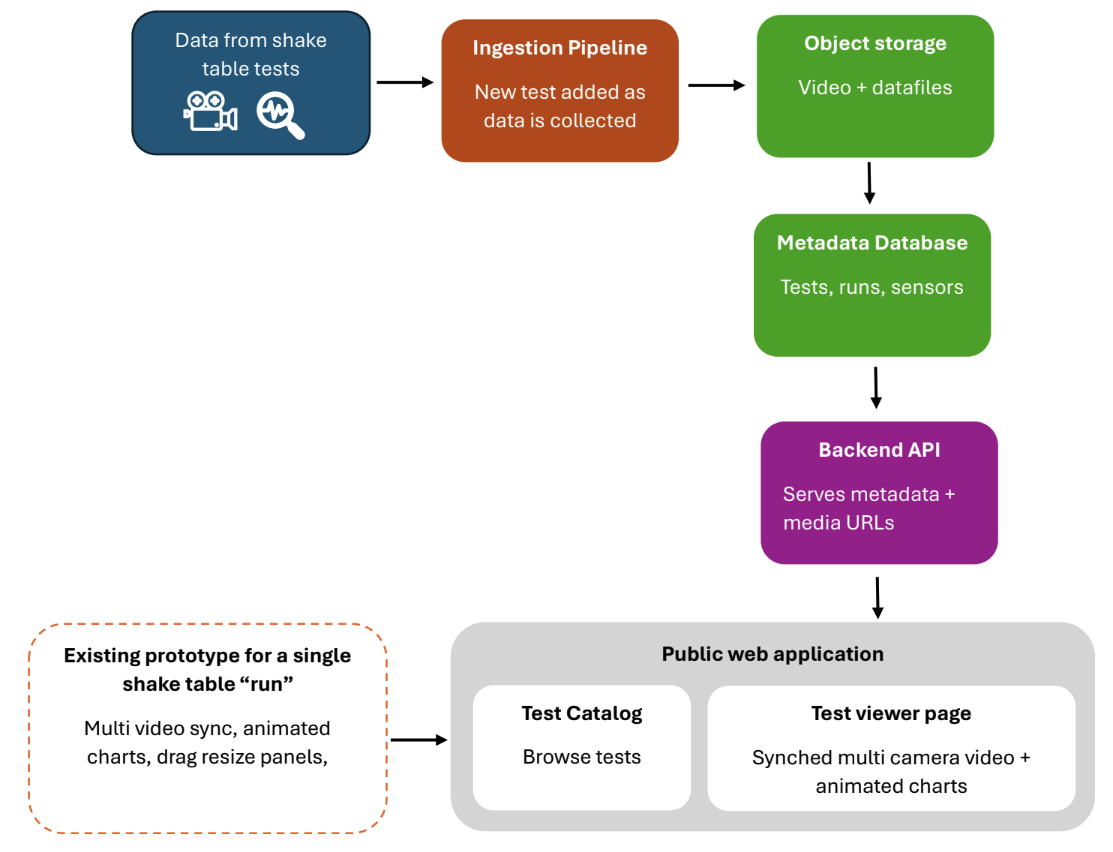
Figure 1. high-level view of the proposed architecture
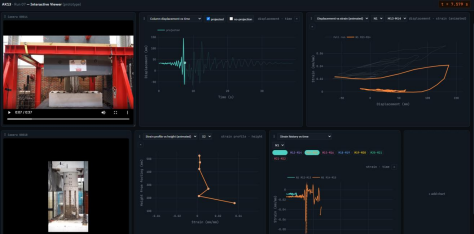
Figure 2. single shake table run prototype
Core requirements:
- Test catalog page listing the tests (currently numbering 30) with searchable/filterable metadata.
- Per-test viewer page: multiple synced camera videos plus animated strain-history, displacement, and strain-vs-height-profile charts, with channel/marker selection, and photo viewer.
- Interactive figures that shows the instrumented bars and markers
- Backend API and database for test metadata, separate from a defined ingestion process for adding new tests.
- Object storage for video/data files, efficient enough for public streaming across 30 tests worth of video.
- The whole system deployed and reachable at a public URL.
Stretch Goals
- Cross-test comparison views (e.g., overlay strain histories from two different specimens).
- An admin interface for uploading and managing new test data without direct file or database access.
- Citation/export features a shareable permalink or citation block per test, potentially linking out to a research data repository such as DesignSafe-CI (an NSF-funded natural hazards engineering data repository) for the archived, citable version of the raw dataset.
Benefit to End Users
Researchers, students, and collaborators get a single place to explore any shake table test result, watching the actual specimen behavior alongside the exact sensor data driving it rather than reconstructing that picture manually from separate files. It also gives the CFL and NC State a durable, growing public record for its testing program.
Technologies and Other Constraints
- Frontend: a component framework (React or similar) with a charting library capable of animated, time-synced visualizations (the existing prototype uses Plotly.js as a reference point, not a requirement).
- Backend: a lightweight API framework (e.g. Python/FastAPI or Node/Express) with a database for structured test metadata; large sensor time-series stored as flat files rather than SQL rows.
- Storage: object storage for video and data files.
- Data will continue to be produced throughout the year, so the ingestion pipeline is an actively used deliverable, not a one-time script.
- The existing single-test prototype is provided as a design reference for the intended viewer-page interaction, not as a required starting codebase. The team is free to design the system architecture from scratch.
Sponsor Background
The Laboratory for Analytic Sciences is a research organization in support of the U.S. Government, working to develop new analytic tradecraft, techniques, and technology that help intelligence analysts better perform complex tasks. Processing large volumes of data is a foundational capability in support of many analysis tools and workflows. Any improvements to existing processes and procedures, whether they are measured in time, efficiency, or stability, can have significant and broad reaching impact on the intelligence community’s ability to supply decision-makers and operational stakeholders with accurate and timely information.
Background and Problem Statement
Large Language Models (LLMs) have demonstrated remarkable capabilities in natural language understanding, logical reasoning, and content generation. However, evaluating their capacity for complex social dynamics like persuasion, deception, and collective decision-making under uncertainty remains a significant challenge. Traditional AI benchmarks typically evaluate models on static tasks in isolation, which fails to capture the interactive, multi-agent scenarios that mirror real-world environments where information is asymmetric and agents must adapt to conflicting claims.
As LLMs are increasingly deployed in collaborative and interactive environments, understanding their social reasoning capabilities is critical. One of the most effective ways to study these dynamics is through games of hidden roles and social deduction, such as Werewolf. In
Werewolf, players must navigate incomplete information to build trust, detect manipulation, expose adversaries, and protect allies. While researchers can have LLMs play these games, there is currently a lack of a comprehensive, standardized framework to evaluate not just game outcomes, but the underlying behavioral dimensions of the agents.
Without a targeted benchmark, it is difficult to isolate and quantify specific social capabilities, such as how models conceal information, how susceptible they are to manipulation, or how they coordinate with allies when faced with deception. A robust evaluation framework is needed to study these underlying behaviors, track strategic consistency across rounds, and expose strengths and weaknesses that aggregate win rates alone cannot adequately capture.
Project Description
The project team will develop NIGHTCOUNCIL, a novel multi-agent benchmark designed to evaluate how effectively large language models engage in social reasoning, persuasion, and deception through the game of Werewolf. The system will enable LLM agents to participate in simulated games as villagers, werewolves, and other specialized roles, where they will attempt to identify adversaries, influence voting, and adapt their strategies as new information emerges.
The primary objective of the team is to build an evaluation framework that measures both standard game outcomes and the underlying behaviors that produce them. The system will track evaluation dimensions including role-identification accuracy, persuasiveness, deception quality, strategic consistency, trust formation, susceptibility to manipulation, and the ability to reason from conflicting claims. Additionally, the framework will test instruction hierarchy by introducing intentional contradictions between system-level directives, like the system prompt, and game rules. For example, assigning a model a role that requires lying while its system prompt strictly forbids deception with the goal of evaluating which constraints models prioritize under conflict. Finally, the system must capture and export detailed game transcripts to support qualitative analysis of how models justify their decisions, coordinate with allies, and recover from incorrect assumptions.
Furthermore, the team will design and implement controlled game variations intended to isolate specific AI capabilities. For example, the team will introduce a modified rule set that assigns a single villager the authority to choose who is eliminated. Under these rules, non-werewolf players will know this individual’s identity and must persuade them, while werewolves must infer who holds the role and attempt to influence or eliminate them (with role transfer and balance mechanics built in). By implementing these variations, the team will make it possible to study specialized capabilities such as targeted persuasion, authority detection, information concealment, and coalition formation under asymmetric information.
Technologies and Other Constraints
The team will have great freedom to explore, investigate, and design the multi-agent LLM evaluation framework described above. However, the methodology employed should not have any restrictions (e.g. no enterprise licenses required). In general, we will need this technology to operate on commodity hardware and software environments, and only make use of technologies with permissive licenses (MIT, Apache 2.0, etc).
Beyond these constraints, technology choices will generally be considered design decisions left to the student team. The LAS will provide the student team with access to AWS resources for development, testing and experimentation, along with API access to hundreds of LLM models including the latest models from frontier labs.
ALSO NOTE: Public distributions of research performed in conjunction with USG persons or groups are subject to pre-publication review by the USG. In the case of the LAS, typically this review process is performed with great expediency, is transparent to research partners, and is of little to no consequence to the students.
Sponsor Background
The Laboratory for Analytic Sciences is a research organization in support of the U.S. Government, working to develop new analytic tradecraft, techniques, and technology that help intelligence analysts better perform complex tasks. Processing large volumes of data is a foundational capability in support of many analysis tools and workflows. Any improvements to existing processes and procedures, whether they are measured in time, efficiency, or stability, can have significant and broad reaching impact on the intelligence community’s ability to supply decision-makers and operational stakeholders with accurate and timely information.
Background and Problem Statement
Artificial Intelligence models can perform many complex tasks (e.g. reasoning, comprehension, decision-making, and content generation) which until recent years have only been possible for humans. Like humans though, an AI model generally works best on tasks that it was specifically trained to perform. While general purpose models (often called foundational models, or pretrained models) can have surprisingly strong performance across a range of applications in their domain, they are typically outperformed within any particular subdomain by a model which was specifically trained for that more narrowly scoped application. The most common approach to building these more specialized models is to start with a foundational or pretrained model, and then fine-tune it using a dataset drawn from the more narrow subdomain so that the new model is specifically trained, and hyper-focused, on that subdomain.
The Laboratory for Analytic Sciences (LAS) has been fine-tuning AI models for many years, and expects to continue doing so for many more. So, it would be desirable to make this process as efficient, effective, and user-friendly as possible. To that end, we would like to develop an application designed to enable the data scientist to perform fine-tuning to the greatest effect possible.
Consider the speech-to-text (STT) model Whisper from OpenAI. Out of the box, this model is capable of producing very accurate transcriptions over a wide range of speech audio recordings (i.e those having differing languages, dialects, accents, noise environments, verbiage, etc). Now suppose that a user is only concerned with transcribing speech audio originating from a single environment and a single speaker, e.g. perhaps a recording of a professor’s lectures throughout a semester. This is a far more narrow subdomain of application. Rather than simply applying Whisper to the audio recordings, perhaps we wish to make a better performing model by fine-tuning a custom version of Whisper for this particular application. Taking Whisper as a pretrained model, i.e. a starting point for the eventual model to be trained, we would first gather a relatively small set of labeled data, meaning recordings that are paired with manually produced ground truth transcriptions of what was spoken in the audio. In the example of lecture recording, this might mean going to class for the first week of the semester, recording the audio, and manually transcribing everything that was spoken. With this labeled dataset in hand, the next step would be to fine-tune Whisper. Optimal procedures for fine-tuning an AI model can be a very complex process, and is perhaps both an art and a science, but general procedures are fairly straightforward to implement. The result will be a fine-tuned Whisper variant that, in all likelihood, will produce more accurate speech-to-text results when applied to future recordings of the professor’s class. Important to note, this fine-tuned model may presumably perform worse than the original Whisper model on most other applications.
One critical feature we would like to explore in the case of STT fine tuning is the data augmentation. Data augmentation can help with several fine-tuning issues. One issue is that the fine-tuning data sets are typically rather small since they typically require manual labor to create them. Therefore it may not represent the class of audio to be processed as well as it could. Another issue with small fine-tuning data sets is that they may contain spurious correlations between training data and outcomes. The model may tend to hyperfocus on such correlations rather than learning the more complex, but truly indicative, patterns. Model "overfitting" follows. Data augmentation can combat both of these issues.
The basic concept of data augmentation is to take each audio file of the fine-tuning data set and generate a number of modified variants of it. These variants are then to be added back into the fine-tuning data set as supplementary training material prior to application of the actual model fine-tuning procedures. There are many ways to consider modifying an audio file to create a variant, but for example one could simply add random Gaussian noise to the recording. Alternatively one could modify the playback speed very slightly. For a more complicated example, one could use reverberation info to make the audio sound like it was recorded in a different background environment than it actually was. In any case, data augmentation techniques such as these result in a larger, more rounded, fine-tuning data set. Intuitively, this more rounded data set can represent the class of audio in question since the remainder of the class is likely only some perturbation away from an existing training sample. It also destroys many spurious correlations between various characteristics in the training data to the ground truth, reducing the possibility of overfitting. Empirically, data augmentation often produces more stable, robust models.
Project Description
The LAS would like a Senior Design team to develop a prototype system that enables fine-tuning of the STT model Whisper using a variety of data augmentation techniques. The system should have a web UI which lets users select which data set, which base model, and which set of data augmentation techniques to employ. The system should display model performance metrics on test data sets within the UI to enable comparison of the effectiveness of various data augmentations. The goal is to support continued exploration and investigation into the most effective methods.
The LAS will provide base scripts to perform fine-tuning, access to an AWS development environment with which to perform all development functions, and access to a variety of training data sets. The Senior Design team will be asked to design the system, to investigate, create and implement data augmentation techniques, and to exercise the system by performing a basic investigation into the effectiveness of the data augmentation techniques made available. Time permitting, generalizing the system to enable use of several additional STT models (e.g. Voxtral, Qwen-ASR, etc) would be an excellent stretch goal.
Technologies and Other Constraints
The team will have great freedom to explore, investigate, and design the fine-tuning system described above. However, the methodology employed should not have any restrictions (e.g. no enterprise licenses required). In general, we will need this technology to operate on commodity hardware and software environments, and only make use of technologies with permissive licenses (MIT, Apache 2.0, etc). Beyond these constraints, technology choices will generally be considered design decisions left to the student team. The LAS will provide the student team with access to AWS resources for development, testing and experimentation, including GPU availability for model training.
ALSO NOTE: Public distributions of research performed in conjunction with USG persons or groups are subject to pre-publication review by the USG. In the case of the LAS, typically this review process is performed with great expediency, is transparent to research partners, and is of little to no consequence to the students.
Sponsor Background
This request is part of an ongoing project within the Civil, Construction and Environmental Engineering (CCEE) Department, sponsored by the Alaska Department of Transportation and Public Facilities (AKDOT&PF). As the most seismically active state in the United States, Alaska faces unique infrastructure challenges. AKDOT&PF has been supporting NC State research focused on enhancing the seismic safety of bridges for over 20 years.
Background and Problem Statement
After a damaging earthquake, it is critical to quickly determine the status of civil infrastructure, such as highway bridges. This helps state agencies make informed decisions, avoid unnecessary risks, and reduce potential losses. In seismic regions, bridges play a vital role after an earthquake by serving as lifelines, providing access for emergency vehicles and helping reconnect isolated communities.
However, assessing the condition of dozens or even hundreds of bridges immediately after an earthquake is a challenge, especially in states where bridges are spread across vast and remote areas, which is the case of Alaska. Figure 1 shows the transportation network (bridges as circles) overlayed with the intensity of the seismic hazard (darker colors represent a bigger hazard). Sending engineers to every bridge site for inspections can take days or weeks, time that might delay critical emergency response efforts.
The focus of our research project is to develop a rapid and practical method to evaluate the post-earthquake performance of bridges. This project also looks beyond post-earthquake response. The same type of analysis can be used to run scenarios before an earthquake happens to identify vulnerable bridges in advance, improving emergency planning and even informing better design choices.
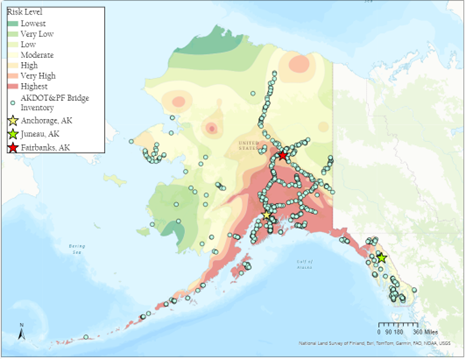
Figure 1. Location of AKDOT&PF bridges and the identified hazard level for different regions in Alaska.
A Computer Science Senior Design team in Fall 2025 developed a full-stack web application designed to assess bridge structural integrity in response to earthquake events. During Spring 2026, a new team made important improvements to the application. The system fetches real-time earthquake data from USGS, performs structural assessments on bridges using scientific models, and provides a web interface for monitoring and management.
Key Features:
Real-time earthquake data ingestion from USGS
Automated bridge structural assessments
User authentication and role-based access control
Interface map-based visualization
Admin dashboard for managing bridges, users, and seismic stations
Project Description
While Phases I and II of the Rapid Post-Earthquake Assessment Tool enabled the completion of key components, the following tasks (Phase III) are recommended to further develop the system and prepare it for use by engineers in post-earthquake decision-making.
Some tasks are expected to be relatively straightforward to implement, while others will require more significant development effort. They vary in complexity and level of effort, and priorities can be discussed and established with the student team at the start of the project.
Landing Page (low complexity, medium priority)
Include a landing page where instructions for users to operate the tool should be displayed;
Primary contact information (AKDOT&PF point of contact) should be displayed;
Frequently Asked Questions section should be displayed;
The 10 most recent earthquakes above a specific threshold should be displayed (along with a map with the epicenters and bridge locations).
Documentation Page (low complexity, high priority)
Update page with information provided by the CCEE Earthquake Research Team.
Expand the documentation to include information on ground motion models (GMMs), hazard characterization, and workflow for GMM selection
Email Notification (low complexity, low priority)
Improve the PDF documenting the Inspection Priority List.
Assessment Algorithms (high complexity, high priority)
Integrate recent updates to the assessment logic that were developed in MATLAB by the CCEE Earthquake Research Team, translating and implementing them in Python.
Bridge Database Page (medium complexity, medium priority)
Include an inventory map alongside the table with the bridge database.
On the map, when you hover over a bridge, its number pops up.
Individual Bridge Page (high complexity, high priority)
Bridge system-level values (EQ-independent information, such as system displacement, total base shear, effective period, effective stiffness, etc.) should be displayed in table form on the individual page.
Bridge system-level values (EQ-independent) should be exportable in CSV format.
When switching the units from “imperial” to “metric”, the units from the EQ independent table should be changed as well.
Key plots (which rely on the EQ-independent data) should be displayed on the individual page.
In the “Assessment History” of each individual bridge, it is important to have a part for each event that directs us to a specific page that matches Specific Event + Specific Bridge, where we can find detailed information, such as plots and tables (EQ-dependent), of the bridge response under that event.
Individual Event Assessment Page (high complexity, high priority)
The Inspection Priority List PDF should be exportable and correctly match the assessment page.
The Inspection Priority List CSV should be exportable and correctly match the assessment page.
The Inspection Priority List should be filterable by specific bridge characteristics.
The bridges in an IPL that have the same color should be sorted by Inelastic Capacity Used.
If a USGS ShakeMap is available for that event, it should be imported and overlaid the map with epicenter and bridge locations.
On the map, when you hover over a bridge, its number pops up, and we should be directed to the bridge’s page.
Assessment Settings Page (medium complexity, high priority)
Run the assessment in different earthquake input levels (more information to be shared).
Simulations (high complexity, high priority)
If assessment logic is modified, new simulations should follow the new logic.
The user should be able to see the simulations ran by other users.
The user can create simulations while offline.
Include the units on the inputs for simulations (focal depth, dip, rake).
When clicking new simulations, include the option to select different earthquake input levels.
Median and standard deviation (+1σ, +2σ, and +3σ) of ground motions should be computed for assessment logic.
Compatibility issues between Pyodide and OpenQuake Engine Library should be considered.
Stations Page (medium complexity, medium priority)
Add a list of all stations.
Add site information (i.e., proxy-based VS30).
Create workflow to calculate the nearest stations based on latitude and longitude of bridges.
Communicate with ground motion data centers (e.g., the Alaska Earthquake Center) to extract processed ground motion recordings.
| Low Priority | Medium Priority | High Priority |
High Complexity |
|
| -Assessment Algorithms |
Medium Complexity |
| -Bridge Database Page | -Assessment Settings |
Low Complexity | -Email Notification | -Landing Page | -Documentation |
*Important to note that the complexity level is an estimation.
Technologies and Other Constraints
Technologies to use are based on what Phases I and II of the project seemed appropriate and what Phase III may require for improvements. Recommendations stemming from the completion of Phases I and II of the project include becoming familiar with the available User Guide, Developer’s Guide, and Installation Guide to see the details of Phases I and II.
Resources used during Phase I:
Python
FastAPI
SQLAlchemy
MySQL
Docker
Nginx
React
Vite
TypeScript
Tailwind CSS
Axios
USGS API
vite-plugin-pwa
Microsoft Entra ID Auth
OpenQuake Engine
Students will be required to sign over IP to sponsors when the team is formed
Sponsor Background
NC State DELTA, an organization within the Office of the Provost, seeks to foster the integration and support of digital learning in NC State’s academic programs. We are committed to providing innovative and impactful digital learning experiences for our community of instructors and learners, leveraging emerging technologies to craft effective new ways to engage and explore.
Background and Problem Statement
3D models are created by various groups on campus for courses, projects, or other efforts and previously the website Sketchfab has been used to share those models across campus and even the world. Sketchfab is in the process of being shut down, though, and a new service is needed for both displaying and sharing 3D models.
This project aims to create a utility for the NC State community that will serve as a repository of 3D models created by members of the University and available for use under a Creative Commons license. The expectation is that a service like this would benefit faculty, research groups on campus, and students who may need 3D models to augment their projects but lack the time or skills to produce the models themselves.
Project Description
Ideally this software will take the form of a University-run web repository allowing anyone with a NC State Shibboleth login to upload and download 3D assets to be used in their non-commercial projects (as per the Creative Commons license chosen). Viewing models should be something that is available to anyone, logged in or not. This would allow for the platform to serve as an easy way to share 3D work (whether it be for a course, a research
project, or even a portfolio) while also creating a constantly growing library of 3D assets that can bolster efforts around the NC State community.
As a logged in content author it should be possible to manage my uploads (updating tags and descriptive information, updating the model files, or even removing models if needed). Ideally there will be some organization of models possible (such as creating collections of assets that
are in the same theme, project, or art style). As a user viewing content the expectation would be that models can be viewed in 3D on the web (existing examples of GLB viewers include Don McCurdy's glTF Viewer and the Babylon.js Sandbox), with animations if they have any, and that model files can be downloaded for use in projects. Important information such as the polygon count, materials size and number, and what animations (if any) the model includes would be important to include as well. What file formats are available for download would also be important.
With the potential of this online resource becoming quite large the ability to tag and search uploads would be critical. Tagging (or keywords or whatever system the team decides to use) would be managed by the upload author and then the site would offer a rich search and filtering system to help users quickly find the 3D assets that would help their project.
Optional features could include more social features, such as a “like” system, comments, download stats, or the ability to bookmark/favorite uploads. Following authors and a social feed may also be good features to eventually include. Automatic file conversion (for example, creating FBX and OBJ files if a GLB is uploaded) would be another optional but desired feature.
Other items that would need to be considered for this project would be having different levels of users, including admin level users that can manage the system and accounts on it, a scalable data structure (be it database or some other solution) to support the site, and recommendations for data backup and hosting requirements.
Technologies and Other Constraints
Recommended Technologies:
- ThreeJS for 3D display (preferred, not required)
Required:
- Web-based
- Models downloadable as GLB files (at a minimum)
- NCSU account login (Shibboleth/Entra ID)
Students will be required to sign over IP to sponsors when the team is formed
Sponsor Background
Deutsche Bank is a world leading financial services institution, providing a range of banking products to a range of institutional and private clients on a global scale. We have over 15,000 engineers actively using agentic coding tools.
Background and Problem Statement
As agentic LLM equipped IDE and CLI tools proliferate and are increasingly integrated in regular software development practice, new challenges in delivery emerge. Output of complex code and technical artifacts is now “cheap” in terms of the human time and effort required to generate it, but quality control is a significant challenge. There are two key aspects we identify relating to this:
- As agentic operation becomes more sophisticated and capable, the bar is increased for effective human supervision (HITL) in terms of knowledge and skill the human operator needs to possess
- Cognitive offloading can retard the acquisition of skills and experience through practice and repetition by altering the effort and focus needed to achieve results, undermining immediate learning and potentially also future career development for engineers starting their professional careers
In practice, the low cost of output and the increasing difficulty of ensuring quality control results in a major burden of effort being transferred to an already burdened population of more experienced senior engineers who must review an increasing volume of material being generated with less initial effort and less attention to quality.
The business need is to solve for these problems – to promote and support learning and deeper understanding by the user of the agentic coding tools, while also alleviating the burden on senior engineers by ensuring the responsibility for quality and correctness remains with the code originator as much as possible.
Project Description
The solution
We need a solution to this problem. It should:
- Provide quality feedback and learning to the user, rather than merely fulfilling requests and generating code
- Encourage them to understand more deeply the business case and requirements being met, and to support the development of their problem solving skills, by encouraging them to think on and take more decisions in the process
- Create mechanisms for the provision of quality checks (both agentic/LLM relevant and conventional) within the workflow of the user of the tool (eg do the instructions in files like AGENTS.md specify linting and the coding standards in force?)
- Feedback opportunities to make improvements to standing instructions or the users workflow to the user
At the most simplistic level, this could be implemented purely with skills files and functionality available off the shelf in the modern generation of LLM equipped agentic coding tools.
We would like to go beyond that – to explore more fundamentally shaping the workflow and support available to the user. To do this we can consider things like:
- MCP (model context protocol) services available in the agentic environment to support the goals (we would expect these to be tested, and to implement mechanisms for handling and retrieving data for context management)
- SDLC tool integrations that could catch common failure patterns of the agentic coding tools (eg through static analysis to detect duplicate code)
- Configurable mechanisms to guide user learning and integration into the process of solving problems (eg we cannot anticipate all project specific problems that may emerge, but we can provide a mechanism (eg UI, with backend data storage) to allow senior engineers to communicate the key information/interaction to the user via the agentic environment).
On this last topic there are many examples – but a concrete one might be:
- A senior engineer often needs to provide feedback to junior developer that their code does not respect key design decisions adopted by the project (eg ETL jobs must never run concurrently, ETL jobs must always stop and fail with an error versus retrying or continuing)
- Although in principle these design decisions can be represented in the context made available to the agentic IDE (and arguably should be), this would not solve for the need for the junior developer to understand and learn themselves
- The coding environment could instead of using the knowledge in context, ask the junior engineer a set of questions designed to test their knowledge, proceeding to fulfil the request if the answer is correct, and providing feedback to the junior engineer if it is not
We are in this sense seeking to “shift left” the review of the code, to restore the balance that is being disrupted – where the significant mental effort involved in writing code essentially forced the engineer writing it to understand it and take ownership of it; and is now made more optional (in the short term at least) by LLM equipped coding agents.
Please note we do not want to restrict ourselves to skill files; playbooks, workflows and custom agents may also be considered extensions to a solution (eg not running jobs concurrent may be a skill, process of adding a new job may be a playbook).
Minimum Specification
- Tool must demonstrably support junior engineer learning and quality control
- Tool should be integrated into at least one agentic coding tool
- Tool should use emerging standards such as MCP to provide context to the agentic IDE
- Tool must provide functionality for senior engineers to create instructions that will describe project context and actions that the agentic coding environment is to apply to junior developers
- All service type code (eg MCP) should be unit tested throughout
- LLM functionality should have a relevant evaluation methodology (eg LLM as a judge is one accessible option, but we may consider alternatives)
In the event that the minimum specification is met, stretch goals can include:
- Provide feedback to the user to improve their development process and prompting (eg if we capture data for then the tool intervenes to support or test learning, how effectively is this working, and how can we dynamically adjust the tool to respond accordingly?)
- Analytics UI to show the effectiveness of the tool by developer, and areas requiring greater technical mentorship
- Considering that junior vs senior engineers is not in reality an easily definable set of populations, can we segment this such that the tool is selective in how it responds to the interacting developer? (eg I may be a database expert and a UI novice, I would want a different type of interaction from the coding agent accordingly)
- Any other ideas to solve the problem statement? Scope to innovate…
Relevant articles
- MIT Study Finds Artificial Intelligence Use Reprograms the Brain, Leading to Cognitive Decline - Science, Public Health Policy and the Law
- Cognitive offloading or cognitive overload? How AI alters the mental architecture of coping - PMC
- On the Use of Agentic Coding: An Empirical Study of Pull Requests on GitHub
Technologies and Other Constraints
We expect integration with at least one existing coding assistant tool (eg Claude Code, Github Copilot, Gemini Code assist, etc), but the choice of which one is flexible.
Choice of technologies is left to the students; but if we offer technical advice we note we are best placed to offer feedback with relational data storage, a Python based solution (where application code is needed), and ReactJS for UI elements.
Students will be required to sign over IP to sponsors when the team is formed
Sponsor Background
Katabasis is a non-profit organization that specializes in developing educational software for children ages 8-15. Our mission is to facilitate learning, inspire curiosity, and catalyze growth in every member of our community by building a digital learning ecosystem that adapts to the individual, fosters collaboration, and cultivates a mindset of growth and reflection.
Background and Problem Statement
Creative writing can be a complex task that requires iteration, feedback, and attention to detail. CHAPTERS is a project designed to help students with executive planning, cognitive load, and critical feedback to set them up for success.
In particular, CHAPTERS is built to support science fiction writing for high school students. Students choose specific real-world scientific phenomena as the basis for their story, and develop plots and characters stemming from a theme relating to their science topic. As such, students will need to dive deep into a subject and integrate factual information into their story. This project provides structure for students to collect information, analyze its validity, and organize it for use in a science fiction story.
Project Description
CHAPTERS provides a framework for high school students to conduct research in natural science topics for the purpose of integration into a science fiction story. In using the Research Table, students will log
important pieces of information relevant to their story, in regards to story-specific worldbuilding and the real-life science facts which inform their writing.
In this project, your team will develop a robust interface that allows students to input pieces of information, categorize them as Real-World or Fictional, and back each piece of information with evidence. The interface will implore students to consider the sources of their information, use multiple pieces of evidence to support their facts, and connect pieces of knowledge together. Teachers should also be able to view their students’ research tables and evaluate the quality of their research in their own view.
Your team will design and implement these interfaces with usability in mind. Your solution should factor in the following considerations: In the students’ research table interface, how should facts be organized, given that these will be used in the context of a story? How much flexibility does the user have in their interactions with the interfaces in this project? How do these interfaces support different types of users (i.e. How does the interface support different writing philosophies? What technical accessibility features are relevant for each interface?)?
Technologies and Other Constraints
This project is a web-based application, and will be created using Docker Compose with the following tech stack:
- React for the frontend
- Django/Python for the backend
- MySQL for the database
Students will be required to sign over IP to sponsors when the team is formed
Sponsor Background
Dr. DK Xu is an Assistant Professor in the Department of Computer Science at North Carolina State University. His research focuses on AI system design, large language models, multimodal reasoning, and agentic AI systems for scientific and engineering applications. He is joined by Dr. J. Paul Liu, a Professor in NC State’s Department of Marine, Earth and Atmospheric Sciences (MEAS) and Director of International Affairs in the College of Sciences, whose expertise in coastal and marine geology—including continental shelf sedimentation, seismic profiling, and sea-level rise—provides strong domain grounding for ocean and coastal monitoring applications. Dr. Ruoying (Roy) He is a Goodnight Innovation Distinguished Professor in MEAS and leads the Ocean Observing and Modeling Group; his expertise in physical oceanography, ocean observing systems, and numerical modeling closely aligns with the scientific use cases and validation needs of an AI-enabled coastal monitoring system. The project is further supported by graduate student mentor Bowen (Berwin) Chen, who will provide hands-on technical guidance on video processing, system integration, backend implementation, and development practices throughout the project.
The OceanWatch project builds on the team’s ongoing development of Ocean AI, an LLM-powered science assistant designed to support oceanographic data exploration, analysis, and visualization. Ocean AI currently supports multimodal scientific workflows involving text, tables, numerical datasets, and plots. This senior design project will extend the platform to coastal video data by developing a privacy-aware monitoring and event-alerting module. Rather than requiring a user to continuously watch video streams, OceanWatch will identify relevant time periods, generate structured event records, and present managers with concise alerts supported by annotated video evidence. The project emphasizes system integration and evaluation using existing computer-vision models and algorithms; students will not be required to train a large AI model. The prior Ocean AI proposal established the platform’s multimodal and system-integration foundation.
Background and Problem Statement
Coastal cameras can continuously capture information about beach use, surf-zone conditions, shoreline activity, and changing environmental conditions. However, raw video streams are difficult to use operationally. A coastal manager or researcher cannot continuously monitor multiple cameras, manually identify relevant events, and review long periods of video to determine when and where changes occurred.
Existing coastal webcam programs demonstrate the potential of video for beach-usage monitoring, shoreline analysis, flooding documentation, and public-safety research. They also illustrate the need to transform raw imagery into timestamped measurements and decision-support products rather than presenting video alone.
Several technical and operational challenges remain:
- Raw video must be ingested, sampled, processed, and displayed efficiently.
- People may appear in the footage, requiring privacy-preserving processing before images or clips are stored or presented.
- A single-frame detection is usually insufficient; meaningful events must be determined from changes that persist across time.
- Camera motion, darkness, glare, weather, and temporary occlusion can produce unreliable measurements or false alerts.
- Managers need concise event notifications with supporting evidence, rather than continuous video or unexplained model outputs.
- Ocean and surf activity is dynamic, making it important to distinguish a general visual activity indicator from a validated hazard prediction.
OceanWatch will address these challenges through a progressive, three-level coastal video intelligence system. The resulting prototype will convert live or archived coastal video into privacy-preserving measurements, time-based events, and manager-oriented alerts with annotated visual evidence.
Project Description
The OceanWatch senior design team will develop a web-based coastal video analytics and alerting module that can be integrated into a simplified version of the Ocean AI platform. The system will support either archived video clips or an available live camera feed and will use existing pretrained models and conventional computer-vision methods rather than training new models.
The project is structured around three progressively advanced capability levels.
1. Video Ingestion and Privacy-Aware Scene Analytics
The first level establishes the video-processing foundation.
- Ingest an archived video, HLS/RTSP stream, or supported camera API.
- Sample frames at a configurable rate to control computation.
- Detect people using an existing pretrained object-detection model.
- Blur detected people or faces before processed imagery is stored or displayed.
- Allow an administrator to define regions of interest, such as beach, water, surf zone, or restricted area.
- Produce timestamped measurements such as anonymized person count and surf-zone activity.
- Display an annotated frame and a basic time-series visualization.
2. Temporal Event Detection and Evidence Capture
The second level converts frame-level measurements into meaningful events.
- Aggregate measurements across multiple frames and time windows.
- Apply configurable thresholds, persistence requirements, and recent-history baselines.
- Distinguish a sustained event from a short-lived detection or visual artifact.
- Create an event record containing event type, start and end times, camera, region, measurements, and processing confidence.
- Save an anonymized representative image and a short supporting video segment.
- Detect basic video-quality problems such as a dark, frozen, obstructed, or disconnected feed. • Prevent repeated notifications for the same continuing event.
3. Manager Dashboard, Alerting, and Ocean AI Integration
The third level transforms detected events into an operator-facing decision-support workflow.
- Present active and historical events through a searchable dashboard.
- Display event cards containing location, time, event type, measurement trend, annotated image, and supporting clip.
- Provide configurable alert states such as new, acknowledged, dismissed, and resolved.
- Generate a concise Ocean AI summary from structured event data.
- Allow a manager to mark an event as useful, incorrect, or requiring threshold adjustment.
- Produce a daily or shift-level summary of important video events.
- Maintain a transparent connection between each summary and its underlying measurements and video evidence.
The system will be designed as a decision-support prototype. It will not autonomously issue emergency warnings or claim that visual activity alone constitutes a validated coastal hazard.
Representative Voice Interaction Scenarios
To guide design, implementation, testing, and final presentation, each capability level includes two representative scenarios. These scenarios define concrete minimum behaviors while leaving room for students to improve performance and user experience.
Level 1: Video Ingestion and Privacy-Aware Scene Analytics
Scenario 1: Privacy-Preserving Beach Occupancy Monitoring
The system receives a short coastal video clip or live beach-camera stream. It samples frames, identifies people using a pretrained detection model, and blurs the corresponding image regions before presenting or storing processed output.
The system then:
- Counts the number of detected people in a configured beach region.
- Displays an anonymized annotated frame.
- Shows the count and timestamp.
- Generates a short count time series for the processed interval.
- Separates detections inside and outside the configured monitoring region.
This scenario introduces students to video ingestion, model inference, spatial regions, privacy processing, and frontend overlays without requiring model training.
Scenario 2: Surf-Zone Activity Measurement
An administrator defines a surf-zone region on a fixed coastal-camera view. The system uses frame differences, optical flow, whitewater intensity, or another suitable existing method to estimate a relative surf-activity indicator over time.
The system then:
- Displays the configured region on the video.
- Computes a normalized activity score for each time window.
- Presents a time-series chart of changing activity.
- Identifies frames associated with low and high measured activity.
- Clearly labels the result as a relative visual indicator rather than an exact wave-height or hazard estimate.
This scenario introduces temporal video processing and environmental analysis while keeping the scientific claim appropriately bounded.
Level 2: Temporal Event Detection and Evidence Capture
Scenario 1: Sustained Beach Crowding Event
A monitored beach region becomes increasingly occupied. Rather than triggering an alert from one frame, the system calculates the average anonymized person count over a configurable interval. An event is created only when:
- The count exceeds a configured threshold.
- The condition persists for a minimum duration.
- The camera feed passes basic quality checks.
The resulting event record includes:
- Event start and end times.
- Maximum and average person counts.
- An anonymized annotated image.
- A short anonymized video clip.
- A person-count trend surrounding the event.
This scenario requires students to design temporal logic, event state management, evidence capture, duplicate suppression, and false-alert reduction.
Scenario 2: Unusual Surf-Activity Event
The surf-activity indicator increases substantially relative to either a configured normal range or the recent video baseline. The system determines whether the increase persists long enough to be recorded as an event. The event includes:
- The current activity score and comparison baseline.
- The duration of elevated activity.
- A representative image and short clip.
- A time-series view before, during, and after the event.
- A clear statement that the event represents unusual visual activity and not a confirmed hazard. This scenario requires students to handle noisy measurements, dynamic thresholds, persistence windows, and evidence-based event reporting.
Level 3: Manager Dashboard, Alerting, and Ocean AI Integration
Scenario 1: Manager Reviews and Resolves an Event Alert
A sustained beach-crowding or surf-activity event appears in the OceanWatch dashboard. The manager opens the event and reviews:
- Camera and monitored region.
- Event start time, duration, and status.
- Anonymized annotated snapshot.
- Supporting video clip.
- Measurement trend and threshold.
- Automatically generated short event summary.
The manager can acknowledge, dismiss, or resolve the alert and optionally mark it as a valid event or false positive. The action and timestamp are recorded for future system evaluation.
Scenario 2: Daily Coastal Activity Summary
A manager selects a camera and a time period, such as the previous 12 or 24 hours. The system produces a compact operational summary containing:
- Peak anonymized beach occupancy and its time.
- Number and duration of crowding events.
- Periods of elevated surf-zone activity.
- Camera-quality or missing-data intervals.
- Links to the most relevant event images and clips.
- A concise Ocean AI-generated narrative grounded in the structured event records. This scenario demonstrates how individual detections and events can be organized into a useful management product rather than remaining isolated computer-vision outputs.
The Fall 2026 Senior Design Team Will Prototype an Application with the Following Deliverables
Front-End
- Coastal-camera video player with privacy-preserving annotated overlays.
- Interface for defining beach, water, surf-zone, and restricted regions.
- Real-time or playback views of person count and surf-activity measurements.
- Searchable event and alert dashboard.
- Event evidence page with snapshot, clip, metrics, summary, and status controls.
- Historical timeline and daily-summary interface.
Video Analytics and Back-End
- Video ingestion and configurable frame-sampling pipeline.
- Integration of a pretrained people-detection model.
- Privacy-filtering component.
- Beach-occupancy measurement service.
- Surf-zone activity measurement service.
- Temporal event-detection and event-state engine.
- Camera-quality checks and processing logs.
- APIs supporting frontend configuration, measurements, events, and summaries.
Database and Storage
- Schema for cameras, monitoring regions, measurements, events, evidence, configurations, and manager actions.
- Storage and retrieval of anonymized event snapshots and clips.
- Data-retention configuration and event-data export.
- Traceable linkage from each alert and summary to its underlying measurements and evidence.
Integration and Evaluation
- Working integration with a simplified Ocean AI backend.
- End-to-end implementation of the six representative scenarios.
- Evaluation on a documented collection of coastal video clips.
- Small manually reviewed test set for evaluating people counts and privacy filtering.
- Measurement of processing latency, throughput, and resource usage.
- Event-level evaluation including valid events, missed events, and false alerts.
- System architecture, API, deployment, testing, and user documentation.
- Final demonstration showing progression from raw video to measurements, events, alerts, and management summaries.
Technologies and Other Constraints
Front-End Development
- Build a responsive web interface using React, Vue, or an equivalent framework.
- Provide a video player with timestamp navigation and annotated overlays.
- Support drawing and editing rectangular or polygonal monitoring regions.
- Display person counts, surf-activity indicators, event timelines, and camera-health information.
- Provide an alert dashboard with filtering by camera, event type, status, and time.
- Provide event review controls such as acknowledge, dismiss, and resolve.
- Display Ocean AI summaries together with the underlying evidence.
Back-End Development
- Implement backend services using Python, FastAPI, Flask, Node.js, or an equivalent framework.
- Support archived video and at least one streaming or camera-data access method.
- Use FFmpeg, OpenCV, or equivalent libraries for frame extraction and video processing.
- Integrate an existing pretrained object-detection model for people detection.
- Implement privacy filtering before persistent storage or frontend delivery.
- Implement temporal aggregation, thresholding, persistence, cooldown, and event-state logic.
- Generate and store representative frames and short event clips.
- Provide APIs for dashboard data, camera configuration, event review, and Ocean AI summaries.
- Use asynchronous workers or job queues where needed to separate video processing from user interface requests.
Database and Storage Design
- Store camera metadata, monitoring regions, processing configurations, measurements, events, and manager actions.
- Maintain references between event records, annotated images, clips, and generated summaries.
- Store structured time-series measurements for visualization and evaluation.
- Avoid retaining unprocessed video or identifiable imagery unless explicitly required and approved.
- Support configurable retention and deletion policies for generated media.
- Provide export of event records and evaluation results in CSV or JSON format.
Constraints
- Students will not train a large vision model or large language model.
- Existing pretrained models, APIs, and conventional computer-vision methods may be used.
- The system will not use facial recognition, identity classification, or person re-identification.
- Privacy filtering must occur before processed images or clips are persistently stored or broadly displayed.
- The prototype is not a certified emergency-warning or public-safety system.
- If a reliable live stream is unavailable, archived coastal videos will serve as the required fallback. • The processing pipeline should use frame sampling, batching, or configurable resolution to operate within available computing resources.
- Model licenses, API costs, and third-party data-use requirements must be documented.
WebCOOS is a particularly relevant implementation reference because it supports camera media ingestion, archived video, streaming formats, time-series analysis products, object detection products, and programmatic API access.
Students will be required to sign over IP to sponsors when the team is formed
Sponsor Background
Siemens Healthineers develop innovations that support better patient outcomes with greater efficiencies, enabling healthcare providers to meet the clinical, operational, and financial challenges of a rapidly changing healthcare landscape. As a global leader in medical imaging, laboratory diagnostics, and healthcare information technology, Siemens Healthineers has deep expertise across the entire patient care continuum, from prevention and early detection to diagnosis and treatment.
Within Siemens Healthineers, the Managed Logistics organization supports service engineers who perform planned and unplanned maintenance on imaging and diagnostic equipment worldwide. The Managed Logistics team plays a critical role in ensuring that the right replacement parts reach the right engineer at the right place and time, directly contributing to reliable patient care.
Background and Problem Statement
Our maintenance engineer’s tools are required to be re-calibrated every 6-12 months to ensure that when they are doing any work on one of our machines they are returning it to a completely safe state with all nuts tightened properly and electric systems within design tolerances. The goal of this project would be to design a system for assessing and acting on cases where our engineers calibrated tools become lost or are returned for recalibration and found to be out of tolerance of our calibration standards. Every machine that those tools have touched since they were last calibrated needs to be reviewed to determine if the tools used may have compromised the machine.
Project Description
Walkthroughs
Managers: They should be able to view all their engineers’ open cases, each one would have all the information regarding the tool and a list of machines it has been used on since its last calibration. They would be able to enter whether they believe the machine needs to be rechecked for safety or not. If they do not believe it needs to be rechecked, they must justify their reasoning. Once they are done entering their decisions the required work orders to recheck the machines are created. The engineers will perform the rechecks and are required to document everything they did. Managers will be able to keep track of the process on the same screen.
Tool officers should be able to
- See all information related to the status of each case they have assigned is in (New, some progress submitting outcomes, some work orders created / closed
- Ability to enter outcomes one at a time
- Ability to submit multiple outcomes at once
- Ability to mass submit a single justification for multiple no rechecks required
- Ability to cleanly undo any submission
- See every entry for each machine (created, outcome submitted, if quality rejects it, etc)
- Export an XLSX file for open machines on a case for ease of review with engineer
Quality assurance: There will be another screen where the quality assurance department is able to review the managers’ entered reasoning for the no rechecks and review the documentation from the engineers who did the rechecks. Once every machine has either a ‘no recheck’ with a valid explanation OR a completed work order with approved proper documentation then the case will be closed and disappear from all screens.
QA should be able to:
- Accept or reject ‘no recheck’ justifications, enter rejection reasoning if rejecting
- Accept or reject recheck documentation, enter rejection reasoning if rejecting
- Ability to cleanly undo any submission
- Sort cases by:
- All
- Needs ‘No Recheck’ justification reviewed
- Needs work order documentation reviewed
- Search for a case via case number, tool number, or work order number
Because this entire system would be FDA relevant, very detailed and comprehensive logging would also be necessary for every step. Ability to see statistics on case completion time, with/without undos.

Technologies and Other Constraints
Requirements:
- Frontend would be React, Vite required
- Backend Flask required
- Database SQLite preferred
- Web-based and able to scale properly for half screen usage
Students will be required to sign over IP to sponsors when the team is formed
Sponsor Background
The ARNAV Lab is Dr. Jhala’s research group. They investigate computational structures and methods that are useful in representing and mediating human interpretation and communication of narrative in interactive visual media, such as film and games. The Jhala research group uses symbolic and probabilistic tools to represent and construct coherent visual discourse and apply generative techniques for automated and semi-automated tools to interpret and collaboratively create visual narratives.
Background and Problem Statement
The ARNAV Lab is creating a platform for simulating conversations between groups of people that have rich personalities, experiences, opinions, and expressions. Previous versions of this simulation of bots were developed on Unity and Discord. To augment the LLM-backed conversational interface, we want to take advantage of efficient crowd simulation framework for the Unreal Engine to simulate evacuation scenarios with crowds where every individual character is able to provide details in a conversation about their beliefs, willingness to evacuate, and path planning for evacuation.
Project Description
Based on previous work on running rich game characters in Unity and on Discord, we want to develop communities of AI agents that run efficient simulations of communities and conversations over time. This project moves that work into Unreal Engine, pairing the Metahuman Crowd system’s large-scale agent simulation with individually reasoning, LLM-backed characters so that crowd behavior during an evacuation is not just visually plausible but also conversationally and psychologically grounded — each simulated person can be asked why they are or are not evacuating, what they believe about the threat, and what route they intend to take.
In this project, we will be developing a game framework with the Unreal Metahuman Crowd engine to run a large number of simulated characters with rich personalities and emotions, each driven by an individually run small LLM. The framework will need to reconcile two very different performance profiles: Metahuman Crowd is built to animate and path-find for hundreds or thousands of agents in real time, while LLM inference per-agent is comparatively slow and expensive. A core technical contribution of the project is therefore an architecture that decides, moment to moment, which agents need full LLM-backed reasoning (because they are being observed, queried, or are near a decision point in the evacuation) versus which can run on lighter-weight scripted or cached behavior — allowing the simulation to scale without every agent requiring a live model call.
The resulting system should support the following core capabilities:
1. Agent Initialization and Profiles
Simulated characters (“bots”) are instantiated with rich, AI-generated profiles covering goals, personality, background, visual appearance, and communication style. These profiles drive both how a character behaves in the crowd simulation (e.g., risk tolerance, mobility, group affiliation) and how it converses when queried — so a character’s stated beliefs about the emergency and its simulated evacuation behavior remain consistent with each other.
2. World Building, Time, and Events
Locations in the simulated world (analogous to channels in the Discord version) support an overall narrative with schedulable time progression (days, weeks, seasons) and triggerable events such as hurricanes, sporting events, or other emergencies. Events are broadcast to the community as timed messages that prompt agent response, and event severity is determined by a built-in chance mechanism (die rolls), so the same event type can unfold differently across simulation runs.
3. Demonstration World
A demonstration world lets users observe bots going about their daily lives through ordinary conversations and interesting scripted events, providing a testbed for the crowd/conversation architecture outside of pure evacuation scenarios. As a stretch goal, the team may extend this demonstration into a lightweight RPG-style experience if inclined.
Evaluation Focus
Because the motivating use case is evacuation simulation, particular attention should be paid to the fidelity and usefulness of each agent’s expressed beliefs, willingness to evacuate, and path-planning rationale, and to how well those individual, language-driven decisions aggregate into believable crowd-level evacuation dynamics at scale.
Project Objectives / Deliverables
- Stand up a working Unreal Engine project using the Metahuman Crowd / Mass Entity framework capable of spawning and rendering at least 100–300 simulated MetaHuman agents simultaneously at an interactive frame rate.
- Build an agent profile system that generates and stores per-agent goals, personality, background, visual look, and communication style, and that visibly links a profile to its corresponding in-world MetaHuman appearance.
- Implement an LLM integration layer that connects a subset of agents to small, individually run language models, allowing any queried agent to answer in character about its beliefs, willingness to evacuate, and intended evacuation route.
- Design and implement the hybrid reasoning architecture that selectively promotes agents to full LLM-backed reasoning (when observed, queried, or near a decision point) while the remainder run on lighter scripted/cached behavior, so the simulation remains performant as agent count scales.
- Build the world/time/event engine: locations as channels, schedulable time progression (days, weeks, seasons), and triggerable events (e.g., hurricanes) with a die-roll-based severity mechanic broadcast to the community.
- Integrate with Discord via the Discord API (e.g., Discord.js) so that the community can send and receive timed event messages and agent responses.
- Deliver a demonstration world showing bots living out daily routines, conversing, and reacting to at least one scripted evacuation event end-to-end.
- Stretch goal: extend the demonstration world into a lightweight RPG-style playable experience, time permitting.
Technologies and Other Constraints
The framework will interact with Discord via its API using a well-supported client (e.g., Discord.js). Students can propose the language and paradigm for the framework itself, but a web-based platform is suggested. Use of an LLM, and likely an image model, will be necessary.
Sponsor Background
FreeFlow Networks is a startup pursuing innovative technologies for potential commercialization. One current project is Whisker Wings, a flight-based game centered on energy management, environmental interaction, and skill-driven play. This project advances the automation of level creation and connects authored levels directly to the game’s procedural environment system, supporting the long-term scalability and quality of content creation for the game.
Background and Problem Statement
Whisker Wings has a level authoring tool that lets a designer lay out a flight path and place checkpoints, obstacles, and collectables along it. Its output already feeds the game’s procedural environment generator, which wraps navigable three-dimensional world geometry (terrain, corridor walls, surrounding landscape) around that path. Designers can author and adjust levels directly, and that hands-on control is something the game wants to keep.
The part that does not scale is validation. A flight game must obey strict physical limits — turn radius, reaction time, speed envelope — and those limits differ from aircraft to aircraft, so whether a level can actually be completed depends on which aircraft is flying it. A course that is comfortable for one aircraft category may be impossible for another. The only reliable way to know today that a level can genuinely be completed by its intended aircraft is for a person to fly it by hand in that aircraft. Every level, authored or generated, carries that manual test-flight cost, and it is what caps the rate at which polished, trustworthy levels can be produced.
The motivation for this project is to remove the need to manually fly each level. Designers should keep full control to author and adjust levels by hand; what should go away is the requirement that a human pilot the level to confirm it plays. The tool should instead establish automatically whether a level can be completed by the specific aircraft category it is intended for — and ideally produce levels that are completable by that aircraft by construction — without a manual test flight. This is the difficult, central problem of the project.
Project Description
The proposed solution increases the autonomy of the level tool while preserving hands-on designer control. A designer can author and adjust a level directly, or supply high-level intent — such as the aircraft category a level is meant for and the selection and density of obstacles and collectables — and have the tool generate a candidate layout to refine. Either way, generated or hand-built layouts feed through the existing pipeline into built three-dimensional environments, which is a near-complete, natural part of this flow rather than a separate effort.
Generation should be parameterized by aircraft category — a grouping that fits similar aircraft together — so that a generated level suits the kind of aircraft it is meant for.
The central and most difficult part of the project is removing the manual test flight. Instead of a person flying a level to confirm it is playable, the tool should establish flyability automatically — for example by generating paths that respect the target aircraft category’s handling by construction, or by validating a finished level through an automated, simulated flight rather than a human one. Solving this is the core challenge the team should focus on.
Example use cases include:
- Confirming that a level is playable without a designer having to fly it by hand
- Authoring or adjusting a level directly and having it checked for flyability automatically
- Generating candidate level layouts from high-level designer intent for the designer to refine
- Generating levels suited to a particular aircraft category
Technologies and Other Constraints
Existing Environment:
- Students will be given access to a GitHub repository for the existing Whisker Wings prototype, built in the Godot game engine. The prototype already includes the aircraft and flight physics, a level authoring tool (with editor extensions for laying out paths and placing obstacles), and a procedural environment generator that builds three-dimensional world geometry around a flight path. Students are welcome to propose changes to the prototype as needed to achieve their project objectives.
- Students will be given a copy of the Whisker Wings game design document so that they can understand the intention of the ultimate game and design generation behavior that fits it.
Technical Constraints:
- Game Engine: Godot (version 4.5).
- Programming Language:
- GDScript required for in-game code.
- GDScript (preferred) or C# for tooling code. Type annotations are required throughout.
- Tooling Paradigm:
- Tooling should preferably be exposed inside the Godot Engine editor so the designer can guide and tweak generation (tooling is not meant to be player facing).
- Side tooling that generates levels/environments which can then be opened in the Godot editor is also acceptable.
- Generation Approach:
- The core problem is establishing flyability without a manual test flight — for example by generating paths that respect the target aircraft’s handling, or by validating a finished level through an automated, simulated flight. The path output already flows into the environment generator, so that connection can be built upon.
- Designers must keep the ability to author and adjust levels by hand; automation should assist this workflow, not replace it.
- Generation should be parameterized by aircraft category — a grouping of similar aircraft — so generated levels suit the aircraft they are meant for.
- Existing Game Code & Assets:
- Addition of new game assets or modification to existing assets (e.g. course obstacles) is allowed. Please discuss changes with the sponsors.
- Modification of the core flight physics and control system is not allowed. If a change is needed, please speak with the sponsors before proceeding.
- The core swept-mesh environment generator internals are considered stable and should not be modified directly. Build on top of them through their existing interface; if a change appears necessary, discuss it with the sponsors first.
- The Godot project configuration file should only be edited through the Godot editor, not by hand.
Students will be required to sign over IP to sponsors when the team is formed.
Sponsor Background
Impartial is a criminal justice nonprofit. We exist to build meaningful human connections and programs that improve the criminal justice system through personal and community-driven engagement. Impartial believes that one of the ways to do that is by engaging the future justice leaders in games that can help them to better understand what the US justice system, what role they could play in it and most importantly, what the system could be by using gaming to understand possibilities.
Background and Problem Statement
Impartial has built a 10-part criminal justice video game series based on a real case. The titles include The Investigation, Grand Jury, Plea Deals, Motions to Dismiss, Jury Selection, Prosecution, The Defense, Jury Deliberation, Sentencing, and Post-Verdict. Each game has been developed through NC State’s CS Capstone, creating valuable assets, characters, locations, and narrative elements that can be shared throughout the series.
For consistency and efficiency, the games use the same characters, names, and scenes. A previous Senior Design team consolidated these individual games into a single connected experience where player choices and narrative decisions carry throughout the case. The next challenge is to refine this experience, ensure that choices have meaningful consequences across chapters, and prepare the game for broader educational use.
Project Description
Multiple student teams over the past several years have developed separate games within the same narrative of a single court case. An alpha version of the game was created in parts and assembled using the RenPy engine. The team working on this project will take the alpha version of the game and construct a beta version using the Godot game engine, further strengthening the narrative connections between the previously disjoined games, incorporating and expanding the current gameplay mechanics and narrative significance of choices present in the game.
The modifications and updates during the shift from Alpha to Beta versions of the game will involve dialog management in Godot, game state management, and translation of gameplay mechanics to a more robust game engine.
Technologies and Other Constraints
Previous games have used Ren’Py. Any other technology that you think would be helpful for the best interest of the game should also be considered.
Sponsor Background
Dr. Srougi is an associate professor (NCSU- Biotechnology Program/Dept of Molecular Biomedical Sciences) whose research interests are to enhance STEM laboratory skills training through use of innovative pedagogical strategies. Most recently, she has worked with a team to develop an interactive, immersive and accessible virtual simulation to aid in the development of student competencies in modern molecular biotechnology laboratory techniques.
Background and Problem Statement
Biopharmaceutical manufacturing requires specialized expertise, both to design and implement processes that are compliant with good manufacturing practice (GMP). Design and execution of these processes, therefore, requires that the current and future biopharmaceutical workforce understands the fundamentals of both molecular biology and biotechnology. While there is significant value in teaching lab techniques in a hands-on environment, the necessary lab infrastructure is not always available to students. Moreover, it is clear that while online learning works well for conceptual knowledge, there are still challenges on how to best convey traditional ‘hands-on’ skills to a virtual workforce to support current and future biotechnology requirements. The need for highly skilled employees in these areas is only increasing. Therefore, to address current and future needs, we seek to develop virtual reality minigames of key laboratory and biotechnology skills geared towards workforce training for both students and professionals.
Project Description
The project team has previously created an interactive browser based simulation in a key biotechnology laboratory skill set: sterile cell culture techniques. This learning tool is geared towards university students and professionals. In the proposed project, we intend to develop 2 virtual reality minigames using the Unity game engine to reinforce the fundamental skills required to perform more advanced laboratory procedures that are represented in the simulation. The game interactions occur through the Meta Quest 3 VR system. This project will be a Phase II of a previous senior design project. The refinement for the development of one minigame (i.e. use of a pipet aid, see below) and one prototype biohaptic device was accomplished. This current project proposal will seek to focus on the pipet aid minigame being ready to deliver to users in a classroom setting. Moreover, the project will move forward with the development of a separate minigame dedicated to the use of micropipettes. The enhancements for the pipet aid minigame include: 1) refinement of serial communications to integrate and use the biohaptic in the game, 2) refine game esthetics to include high quality graphics and realism 3) clear feedback on user technique of the pipet aid, and 4) ease of navigation within the game environment. Finally, this team will create a second minigame focused on the use of micropipettes. This second minigame will use a similar workflow to the pipet aid minigame and the team will work to design a bespoke biohaptic prototype for micropipette usage that can integrate in the game.
Minigame content: All minigames will feature the following core laboratory competencies that would benefit exclusively from advanced interactivity and realism: 1) how to accurately use a single-channel set of pipettes (not created) and 2) how to accurately use a pipet aid (minigame that has been created).
Length and Interactivity: Minigames should aim to be around a 10-15 min experience. The games should allow users free choice to explore and engage in the technique while providing real-time feedback to correct any errors in user behavior. They should be adaptable for future use with biohaptic feedback technology to provide a ‘real world’ digital training experience. A prototype biohaptic pipet aid has been created and is available to iterate upon and improve.
Cohesion: The set of minigames should connect to themes and design represented in the virtual browser-based simulation previously developed. Therefore, the visual design of the minigames should closely match the real-world laboratory environment.
Technologies and Other Constraints
Students working on this project do not need to have the content knowledge of biotechnology or biotechnology laboratory skills. However, a basic interest in the biological sciences and/or biotechnology is preferred. This project will be a virtual reality extension of a browser based interactive simulation written in 3JS within a GitHub repository. Development of the minigames should be built in Unity. Games should be designed to be run on relatively low-end computer systems and guided by accessibility. Proper licensing permissions are required if art and/or other assets are used in game development.
Students will be required to sign over IP to sponsors when the team is formed
Sponsor Background
Dr. Stallmann is a professor (NCSU-CSC) whose primary research interests include graph algorithms, graph drawing, and algorithm animation. His main contribution to graph algorithm animation has been to make the development of compelling animations accessible to students and researchers. See mfms.wordpress.ncsu.edu for more information about Dr. Stallmann.
Background and Problem Statement
Background.
Galant (Graph algorithm animation tool) is a general-purpose tool for writing animations of graph algorithms. More than 50 algorithms have been implemented using Galant, both for classroom use and for research.
The primary advantage of Galant is the ease of developing new animations using a language that resembles algorithm pseudocode and includes simple function calls to create animation effects.
Problem statement.
A web-based version of Galant, galant-js, is available at https://galant.csc.ncsu.edu/ or via the github repository galant-js (https://github.com/mfms-ncsu/galant-js). Developed by a Spring 2023 Senior Design Team and enhanced by teams in Fall 2023, Spring 2024, Fall 2024, Spring 2025 and Fall 2025, it has been used in the classroom (Discrete Math). Several graph and tree algorithms have been successfully implemented. An important next step is to make the creation and execution of algorithms as well as navigation of graphs accessible to users who are blind. A tool that allows blind and sighted users to collaborate in creating and navigating graphs has already been developed and is being reimplemented in Typescript – see the GSK paper (Dr. Balik’s PhD dissertation, also available, has a more detailed description). A Java version of GSK is available. Simple voice output during algorithm execution has been partially and crudely implemented. Keyboard shortcuts, essential for accessibility, already exist for most actions.
Project Description
All teams working on the project are expected to produce transparent code and detailed developer documentation. It is essential that the sponsor, Dr. Stallmann, be able to continue development on his own or with the help of other students and future teams. To that end, he expects to be directly involved in the development, actively participating in coding and documentation.
The biggest challenge will be to allow a blind user to explore/visualize the graph during algorithm execution. Exploratory actions, such as those enabled in GSK, would need to be implemented as an add-on feature that can be invoked by the user at any point during algorithm execution or graph editing.
Technologies and Other Constraints
Students are required to learn and use JavaScript effectively. The current JavaScript implementation uses React and Cytoscape for user interaction and graph drawing, respectively. An understanding of the JavaScript mechanism for speech generation will also be required, but is not hard to learn.
Sponsor Background
Teen Health Research (THR) inc. is a startup dedicated to providing a program for parents and children ages 10 to 19 to inform and facilitate communication related to health and well-being. THR has developed an interactive web app for the program.
Background and Problem Statement
The Let’s Talk app offers a program for teenagers and their parents with resources and tools to discuss issues related to bodies, health, and relationships. The current version of the program includes a static set of well-organized modules, a communication journal, and a prototype of AI-supported journaling features.
Project Description
The basic app is running and has been tested with a small number of focus group users. It is currently in closed beta. The objectives for this semester’s project are:
- Design and implement a collection of activities with a variety of casual interactive games in the spirit of the NYT games (wordle, connections, etc.)
- Design and implement gamification of activities that are playful and engaging in a subtle way and also appeal to both groups of participants.
- Research, design, and implement collaborative games that can be played both synchronously and asynchronously.
Some design and interaction inspirations are Florence, Words with Friends, Keep Talking and Nobody Dies, Stardew Valley/Animal Crossing.
Technologies and Other Constraints
The node based app is deployed on Heroku. The content is drawn from Storyblok CMS via API. Storyblok has custom modules for content development. MongoDB database contains app data such as user profiles. The current app is available at http://go.lets-talk-app.com. http://lets-talk-families.com provides an overview of the program and app.
Students will be required to sign over IP to sponsors when the team is formed
Project Archives
| 2027 | Spring | ||
| 2026 | Spring | Fall | |
| 2025 | Spring | Fall | |
| 2024 | Spring | Fall | |
| 2023 | Spring | Fall | |
| 2022 | Spring | Fall | |
| 2021 | Spring | Fall | |
| 2020 | Spring | Fall | |
| 2019 | Spring | Fall | |
| 2018 | Spring | Fall | |
| 2017 | Spring | Fall | |
| 2016 | Spring | Fall | |
| 2015 | Spring | Fall | |
| 2014 | Spring | Fall | |
| 2013 | Spring | Fall | |
| 2012 | Spring | Fall | |
| 2011 | Spring | Fall | |
| 2010 | Spring | Fall | |
| 2009 | Spring | Fall | |
| 2008 | Spring | Fall | |
| 2007 | Spring | Fall | Summer |
| 2006 | Spring | Fall | |
| 2005 | Spring | Fall | |
| 2004 | Spring | Fall | Summer |
| 2003 | Spring | Fall | |
| 2002 | Spring | Fall | |
| 2001 | Spring | Fall |